
xTool O1 Omni vs eufyMake E1: Two Machines, One Bench
Same day, same shop, identical artwork: our first xTool O1 Omni and eufyMake E1 luggage-tag prints are here. See the original print photos, the process and why the Omni’s software and setup felt easier to me.
See our first print test and both photos ↓
xTool sent me this O1 at no cost and it is mine to keep. I bought the E1 with my own money. xTool does not see or approve anything before I publish. Product links below may earn us a commission at no extra cost to you.
4 rounds to explore — tap a card, the referee explains the evidence.


A tie — both claim 330 × 420 mm, the same A3+ class. That just means every other round matters more. Usable edge-to-edge area gets measured on this bench.
7 mm vs 5 mm sounds decisive — but both are spec-sheet maximums nobody has measured here, and taller texture drinks more ink per print. The relief tile test settles it.
Biggest gap on the board: about $112 vs $300 per liter, list price ($13.99/125 ml bottles vs $29.99/100 ml cartridges). Real cost per finished piece is exactly what we'll meter.
xTool supplied our O1 Omni DT + UV Versatile Bundle, and we own and retain the printer. We purchased the eufyMake E1 and WonderPress with our own money. xTool does not see or approve our content before publication. Only published, controlled test results can turn a spec-sheet card into a measured result.

First paired print test · Same day · Same shop · Original luggage-tag photos and workflow observations below
Rounds settled on our bench: 0 of 4 — the rest flip to gold as tests publish.
spec sheet = the maker's number, untested · ✓ our bench = we measured it here — cards flip to gold as tests publish. Owner report identifies acquisition and receipt, not a print measurement.
On paper: the xTool O1 Omni claims texture up to 7 mm; the eufyMake E1 claims up to 5 mm. O1 launch ink lists at $13.99 per 125 ml, about $112 per liter; E1 cartridges list at $29.99 per 100 ml, about $300 per liter after the July 13 US price cut, with a replacement printhead around $599. O1's replacement printhead part was listed at $399 in launch material checked September 22, 2026, before labor or service terms; it was not found on xTool's store on October 7, 2026. Both share the same A3+ 330 × 420 mm bed class. E1’s Basic bundle was listed at $2,409 with no limited-time price when checked October 2, 2026; verify the selected SKU and checkout. The O1 Omni has 11 listed configurations from $2,499 to $11,019. Prices rechecked October 7, 2026 after the announced August 15 launch window ended. xTool does not state a new price deadline, so verify the selected checkout. The E1 is in our shop, and our xTool-supplied O1 DT + UV Versatile printer is owned and in our shop. Our first luggage-tag photos and workflow observations are published below; controlled yield, repeatability and durability results remain pending.
What our first print test showed
Compare all 11 O1 configurations · Check machine and accessory shipping · Match an O1 workflow · See required O1 equipment
Same artwork. Two luggage tags. Our first O1 vs E1 test.
Printed · Photos and observations published · Updated : corrected our September 21 note; the white spot in the Omni photo is not in the print
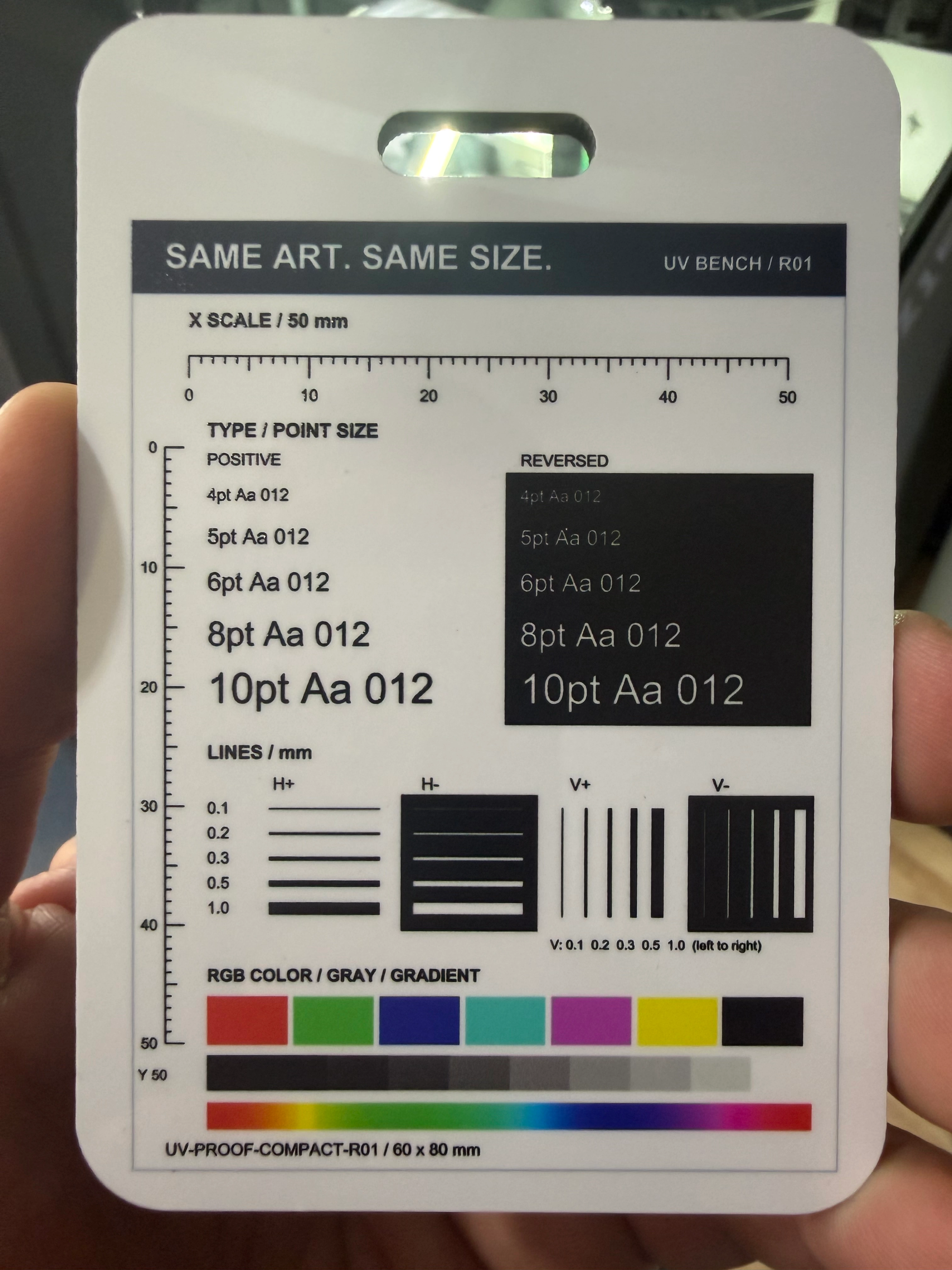
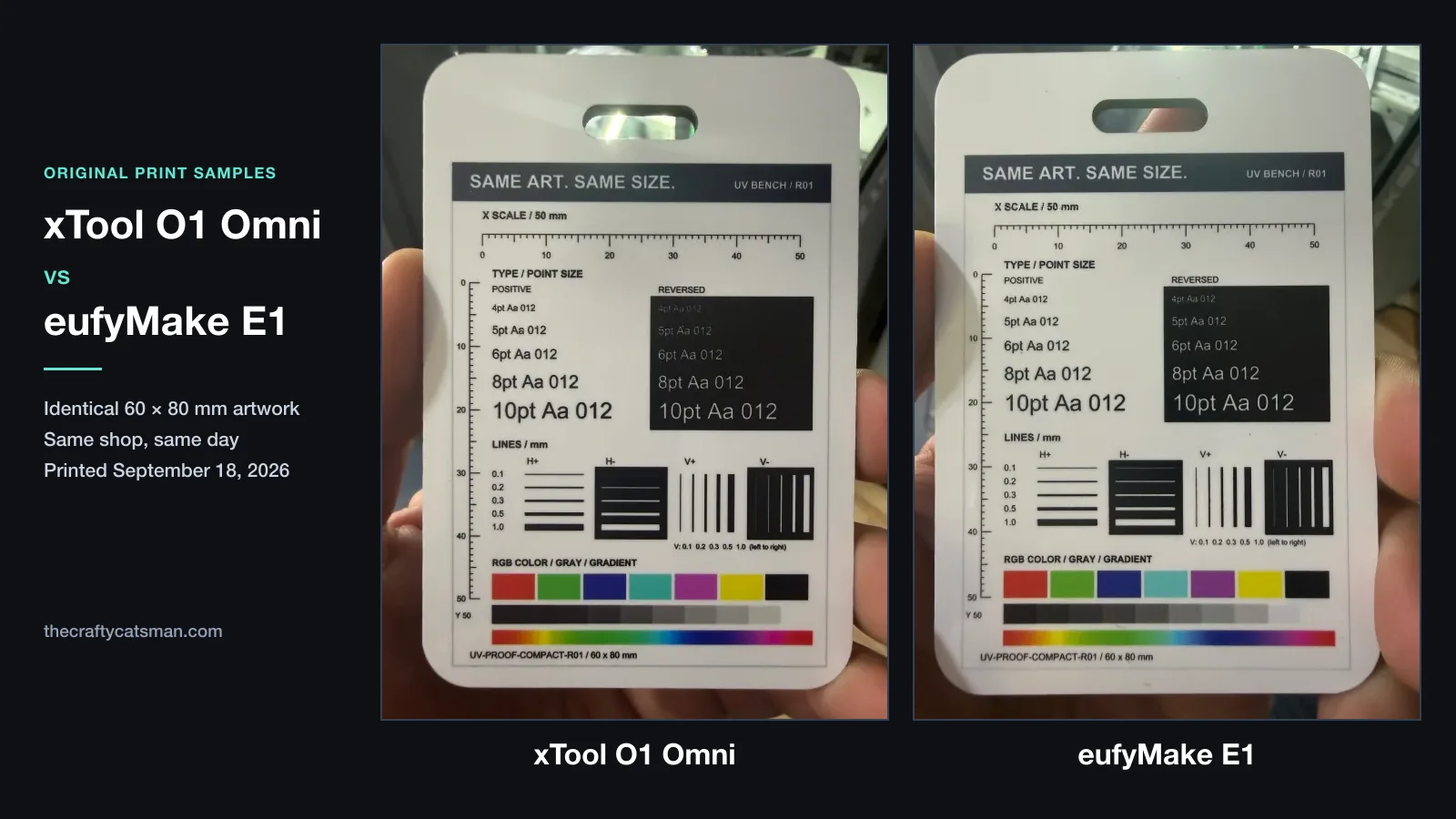
We printed identical artwork on the xTool O1 Omni and eufyMake E1 in our workshop on the same day, September 18, 2026. A small, flat luggage tag on each machine let us compare the path from design to finished piece and inspect the same diagnostic details. These are our original photographs of the two print samples.
xTool sent me this O1 at no cost and it is mine to keep. I bought the E1 with my own money. xTool does not see or approve anything before I publish.
xTool O1 Omni
eufyMake E1
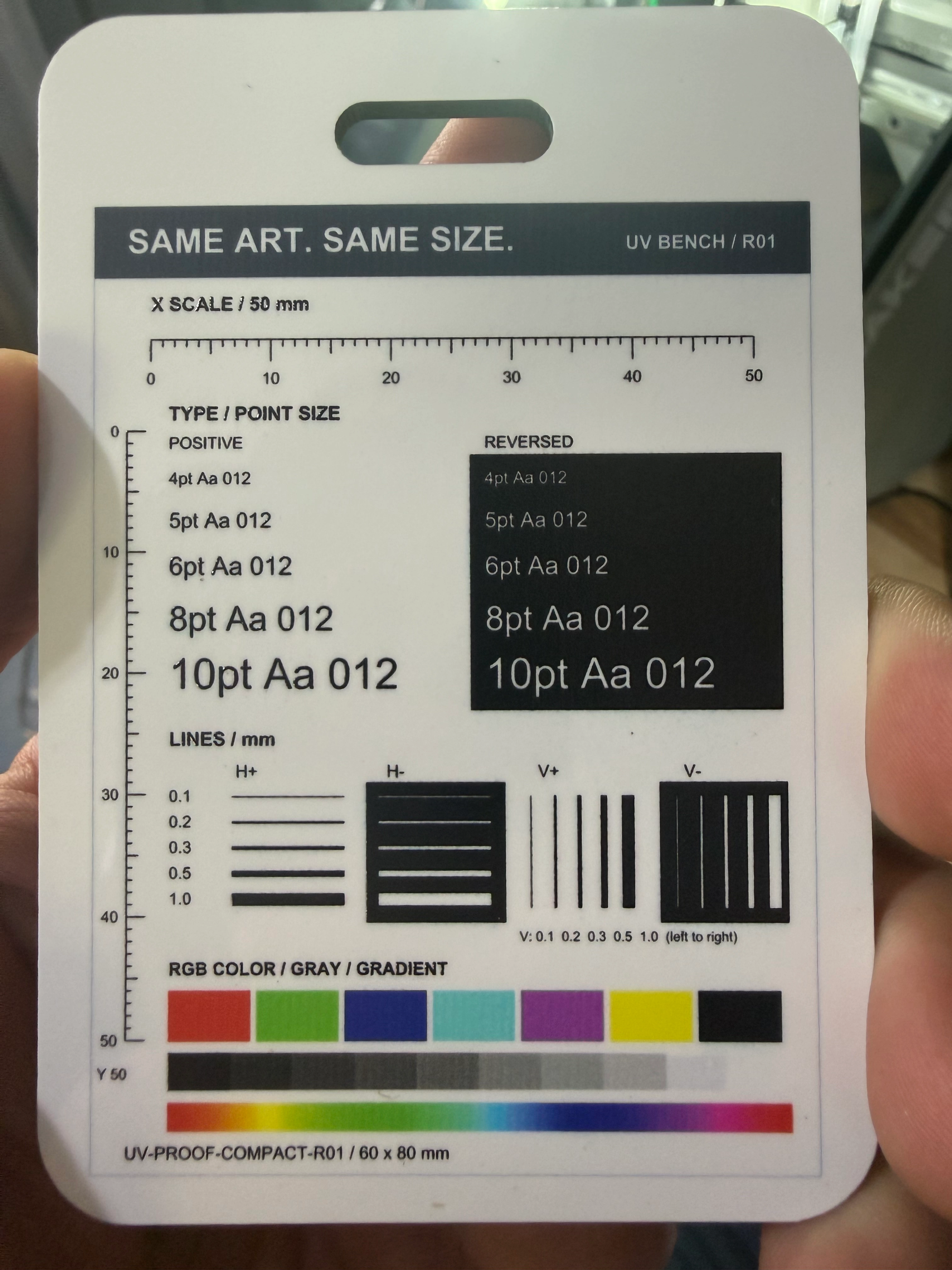
Original photos: The Crafty Catsman. The complete photographs are shown without retouching the prints. Lighting and camera angle differ, so use them to inspect the pieces—not to score color accuracy.
Why this artwork, and why luggage tags?
The blanks were sold as sublimation luggage tags, nominally 2.7 × 3.9 inches, with a white printable face. This was direct UV printing onto those blanks. The artwork, UV-PROOF-COMPACT-R01, was identical in both exports and kept at 60 × 80 mm in each application. That left room to position it inside the rounded edges and clear of the strap slot.
A colorful photograph can hide small defects. This card gives us specific places to look:
- 4, 5, 6, 8 and 10 point type: black text and reversed light text on black, for checking small lettering and filled-in detail.
- 0.1–1.0 mm lines: horizontal and vertical, positive and reversed. H and V identify direction; + and − distinguish dark lines from light gaps.
- Color solids, a gray ramp and a spectrum gradient: areas to inspect for uneven fill and transitions.
- 50 mm rulers: references for later physical size checks. We have not published caliper measurements from this pair.
The setup and alignment process we actually used
xTool O1 Omni
In xTool Studio 1.9.11 on Mac, we imported the artwork at its intended size, scanned the loaded tag and used Color Smart Mask to isolate the white face while excluding the slot. The Subject mask option prompted for login; the Color method worked for this blank. We checked the complete panel inside the tag before processing.
The job used Flat, Color only, one color layer, High quality, with feather at 100%. The O1 warmed up before printing.
eufyMake E1
In eufyMake Studio 4.3.3 on Mac, the printer initially remained in an initializing state and directed us to finish setup in the phone app. Once it was ready, we used Snapshot and the detected outline to position the same artwork.
The tag needed to sit landscape on the mini flatbed. We rotated the artwork to 88° to follow its placement, kept the intrinsic size at 60 × 80 mm, turned Auto-Fill off and set the contour offset to zero. The job used Flat, CMYK, one layer, High Quality, Unidirectional.
A comparison limit: the O1 artwork was at 0° and the E1 artwork at 88° relative to their beds. That changes how the line tests relate to each printer’s motion. This pair documents our first workflow and finished pieces; it does not establish a controlled directional-resolution result.
What felt different in use
For our shop, xTool’s established software ecosystem and easier setup are the clear advantages right now. The Omni felt more intuitive, and lining up the test image felt far faster. More difficult products and repeated placement will test how far that advantage carries.
I already use xTool tools in this workshop, so the established software ecosystem matters to me. The Omni setup felt easier and more intuitive. I did not like having to use my phone to get the Eufy started; I wanted to work from the computer. That describes the setup path I encountered, rather than a claim that every E1 job needs a phone.
Lining up this test image also felt far faster on the Omni. Seeing the scan and applying the mask made this particular tag straightforward to work with. We did not time setup or alignment with a stopwatch, so I am keeping that as an experience report rather than attaching a speed multiplier to it.
In person, the Omni print looks a little more polished to me. The Eufy print has a tiny extra black dot just above V+. It is hard to tell in the photograph, but I can see it on the physical tag. We are nitpicking here: you have to look closely to find it, and one stray dot on one tag does not tell us much about the E1’s print quality. I do not yet know what caused it or whether it will recur.
Correction, : our September 21 update to this section and to the Omni photo caption said the Omni tag also had a tiny white speck above the “A” in the reversed 5pt line. That note came from zooming into the full-resolution photo. I rechecked the physical tag on September 22, and there is no speck in the print. The white spot in the photo was most likely dust or lint when I took the picture. The black dot on the Eufy tag is a different case: I found that one on the physical tag itself, not in a photo.
What the completion screens reported
- xTool O1 Omni
- 3 minutes 19 seconds displayed “Time used.” Warm-up, setup and alignment are not included as a measured total here.
- eufyMake E1
- 3 minutes 4 seconds print time, plus 2 minutes 30 seconds of separately reported maintenance. The preparation screen identified priming.
These are application-reported values from one job on each machine. We did not independently time the runs, and the O1 record has no equivalent separate maintenance total. The displays do not establish which workflow was faster overall.
What this first pair can—and cannot—tell us
This gives us two physical outputs, a documented path through each program and an initial preference for the Omni workflow. One tag per machine does not establish repeatability, dimensional accuracy, ink economy, adhesion or durability. The exact blank composition and surface preparation were not recorded, and this flat color-only run does not test white ink, gloss or raised texture.
The next useful question is whether that easy Omni alignment holds up with more difficult products: awkward shapes, tighter placement and repeat positioning. That is where we will learn how much simpler it is—or whether this first blank made the difference look larger than it is.
Save this page. The comparison is underway.
We are running several tests now, and we will add the next results here with the settings, photographs and limits of each run. Bookmark this comparison to follow the move from these first luggage tags to harder products and more demanding artwork.
See the testing plan · My O1 workshop log · E1 setup and ownership guide · How we document tests
How I’d choose between the O1 and E1 today
My current experience favors xTool for its established software ecosystem and ease of use. On this first paired tag, the Omni felt easier to set up and far faster to align. E1 gives us an independently purchased benchmark; repeatability, measured job cost and durability remain open.

xTool leads here on software, ecosystem and ease of use.
I already work with xTool tools, and its established software ecosystem is a clear advantage in my shop. On our first paired luggage-tag job, the Omni felt easier to set up, more intuitive and far faster to align. That is my workflow experience; repeated and stopwatch-timed tests are still ahead.

E1 gives us a second workflow to test against the Omni.
I bought the E1 with my own money. Its published cartridge, accessory and replacement-part prices help us plan ownership costs, while our paired tests show how the workflow feels in practice. The first tag favored the Omni for setup and alignment; more demanding products will test that impression.
Use this lane when object height, laser registration, and ecosystem lock-in are the decision drivers.
Our independently purchased E1 lets us compare software, print samples, consumable use and texture workflows in the same shop.

The E1 bundle image helps readers see what lives beyond the printer: mats, ink, cleaning, PPE, and setup parts.

The rest of the page turns the hero choice into a spec, cost, support, and workflow matrix.
Disclosure: product links on this page may be affiliate links. We may earn a commission at no extra cost to you. Published claims and owner-reported access remain separate from measured results.
xTool O1 Omni vs eufyMake: Availability, Specs, and Risk
The table separates dated E1 facts from xTool launch positioning. It is a buying-risk table, not just a spec race.
Can it handle taller blanks and longer roll work?
At least 150 mm clearance, 49 ft UV DTF, 39 ft canvas/vinyl, and metallic/holographic effect claims are the stronger published hardware/workflow signals.
Does the UV printer become part of the laser shop?
xTool Studio Print + Cut is the sharper native laser integration story.
Which setup felt easier on the first paired job?
The Omni’s scan-and-mask workflow felt more intuitive, and aligning the same test artwork felt far faster.
Can you model per-job margin before buying?
E1 exposes cartridge, kit, and print-head pricing now.
Configurations and dated prices
Compare the exact equipment, consumables and configuration-specific delivery estimate.
Use xTool O1 Omni as the product name and treat xTool UV Printer as older source wording.
Both printers are already in our shop. These dated estimates concern new orders, not our workflow verdict. Confirm the selected machine and accessory delivery dates at checkout; OR1 Rotary Attachment, LM1 Laminator, and RF1 Roll Feeder may ship separately.
E1's Printer Only variant has the lower checkout number but needs ink; Basic is the print-ready bundle comparison. Current prices, included supplies, timing, and final checkout still decide ROI.
Every current O1 price matched its compare-at price at the source check, so the listing did not show a configuration discount. O1 bundle differences are not standalone accessory prices or savings claims. Compare the exact included equipment on both machines.
Object envelope and bed format
Both machines land in the A3+ bed class; object height is the real physical split.
Bed footprint alone should not decide this comparison.
Thicker blanks are a clear published hardware reason to consider xTool; usable clearance still needs our bench checks.
Architecture and output claims
This is where public claims need same-bench testing before anyone promises speed or repeatability.
Dual UV's second head adds specialty white and fluorescent workflows; Fabric's second head serves apparel. Do not infer a fixed speed multiplier.
Contact-image scanning targets alignment differently from an overhead camera — promising for irregular blanks, but the 0.2mm claim needs bench proof on real objects.
Do not assume a fixed speed multiplier until comparable jobs are tested. eufyMake says a free Q3 2026 bidirectional-print update cut its A4 sample job from 18:34 to 9:30 — a manufacturer test, not yet bench-verified.
Resolution is no longer the main unknown; throughput, registration, ink use, and durability matter more.
Ink, cartridges, and cleaning
Both machines publish ink prices; O1's $399 replacement printhead was listed in launch material (checked September 22, 2026) and not found on xTool's store on October 7, 2026, while E1 still shows the fuller kit picture.
The channel labels matter less than choosing the right edition and modeling ink replacement costs.
Both ecosystems are closed and both now publish consumable prices; per-piece ink use is the remaining unknown.
eufyMake's price cut materially narrows the gap, but O1 launch ink remains about 63% cheaper per ml on paper. eufyMake has also announced a high-capacity ink system for later in 2026 with compatible ink around $0.1x/ml — a manufacturer roadmap, not live pricing — which would narrow this further. Real yield per finished piece is what our bench must meter.
Cleaning and idle waste belong in the purchase model, not just ink color.
Maintenance and recurring cost risk
Closed ecosystems, white ink, printheads, and software costs are ownership variables.
Part prices and manufacturer guidance improve planning, but labor, compatibility, actual life, installed cost, and local service policy still decide total cost.
Treat E1's paid tiers as optional software cost for workflows that need their added credits, quotas, or storage.
O1's architecture is now public, but cleaning draw, waste, and long-idle restart reliability still need same-shop measurement.
Workflow fit and shop advantage
Texture, roll media, and laser registration decide which workshop this actually serves.
O1 now has the bigger published texture-height number; the bench still needs to measure ink use, print time, adhesion, and durability at that depth.
xTool's Update #4 turns the roll path into sticker, label, branded-product, canvas, and vinyl production claims. It still needs proof on media width, feed reliability, lamination waste, transfer durability, and accessory pricing.
Choose Fabric for DTG/textile DTF apparel, not because ordinary UV DTF is exclusive to it.
For blocked areas around a handle, xTool recommends UV DTF instead of promising a full direct wrap.
This could matter for higher-ticket labels, packaging, awards, and branded gifts, but the consumable cost and finish durability decide whether it is margin or just spectacle.
Existing xTool owners have a strong workflow reason to care. The FAQ says support will be available by production O1 delivery; real registration tolerance remains unconfirmed.
Full published spec table
| Specification | xTool O1 Omni (formerly xTool UV Printer) | eufyMake E1 | Advantage |
|---|---|---|---|
| Product Name | xTool O1 Omni / formerly xTool UV Printer | eufyMake E1 UV Printer | xTool official name settled; E1 retail name stable |
| New-order lead-time snapshots | Checked October 7, 2026: Single UV and Dual UV mid November 2026; DT + UV late November 2026 | Checked October 2, 2026: eufyMake US listed in stock, shipping in 1-3 business days | Configuration-specific estimates |
| Entry Price | Single UV: $2,499 current preorder / $2,499 compare-at; checked October 7, 2026 after the announced August 15 launch window ended | $2,409 Basic; $2,109 Printer Only, ink sold separately | Both now modelable |
| Deluxe / Bundle Price | 11 configurations from $2,499 to $11,019; Rotary on all three families, Versatile on Dual UV and DT + UV, Print then Cut (with an xTool P2S or P3 laser) on Dual UV, and Print and Press Deluxe on DT + UV | $3,209 Deluxe | Different buyer lanes |
| Print Bed Size | 330 x 420 mm / 13 x 16.5 in | 330 x 420 mm / 13 x 16.5 in | Comparable |
| Max Object Height | At least 150 mm / 5.9 in | 60 mm standard; 130 mm with Zero-Point Alignment | xTool height advantage |
| Printhead Architecture | Epson F1080: one head on Single UV; two on Dual-Head UV and UV + DT Fabric (also commonly called XP600) | Single-head E1 architecture | O1 offers three distinct head/ink paths |
| Object Positioning / Alignment | Pixel-Scan™ CIS bed scan + line laser; near 1:1 preview; up to 0.2mm; 3D rotary registration (June 22 reveal) | Camera-based alignment; Zero-Point Alignment for thicker objects | xTool new approach |
| Print Mode | Dual-head workflow; final speed TBD | Layered/texture workflow; job time varies by depth | Needs final testing |
| Max Resolution | 720x1440 dpi print resolution; 1440 x 1200 dpi vision resolution | 1440 DPI claimed | Both now publish resolution signals |
| Ink Channels | Single UV: CMYKWV; Dual-Head UV: CMYKWV + rigid/flexible white and fluorescent inks; UV + Fabric: UV plus CMYKWW fabric path | CMYK + white + gloss | O1 has broader launch lanes |
| Ink System Type | 125 ml standard bottles; 290 ml high-capacity white on dual-head editions; closed system with published launch prices | Proprietary 100 ml cartridge ecosystem | Both formats and prices public |
| Ink Cost | $13.99/125 ml launch (≈$112/L); $19.99/125 ml MSRP after the exclusive launch-price period ends | $29.99 per 100 ml cartridge new US MSRP (down from $42.99) | O1 launch price is ~63% lower per ml |
| Ink/Cleaning Kit | No combined ink/cleaning kit listed; ink bottles are priced individually | $209.99 ink/cleaning kit | Kit vs bottles |
| Print Head Replacement | $399 part in launch material checked September 22, 2026; not found on xTool's store on October 7, 2026; approximately 6 months to 1 year xTool reference life; 3 months in all regions core warranty | $599 print-head listing | O1 part not found on xTool's store |
| AI / Software Costs | No UV subscription announced | Core software and printing are free; optional Plus / Pro tiers add AI credits, project quotas, and storage | Different published software models |
| Texture Height (2.5D) | Published spec table lists 7 mm / 0.28 in embossed print height | Up to 5 mm (Amass3D) | O1 higher published claim |
| White Ink Handling | SmartCycle 2.0 stirring/circulation with up to 14 days idle conservative standby guidance; unused dual head can sleep moisturized | JetClean automated | Both automate parts of white-ink care |
| Roll / Film Workflow | Roll Feeder + Laminator: up to 49 ft / 15 m UV DTF transfers; up to 39 ft / 11.8 m canvas and adhesive vinyl graphics | Roll-to-Film Attachment up to 10 m; $499.99 Roll-to-Film Attachment checked July 25, 2026 | xTool longer production claim |
| UV DTF by Edition | Supported on all three editions with Laminator and A/B film | UV DTF requires the separate Roll-to-Film workflow | Fabric edition is not required for O1 UV DTF |
| Rotary Envelope | 101.6 mm max OD; 250 mm max length; 46.5-100 mm open-container ID; handled 40 oz tumblers cannot receive a full direct 360-degree wrap | Rotary workflow available; compare the live accessory envelope | Object geometry decides fit |
| Metallic / Holographic Effects | Laminator claim: gold, silver, and holographic effects on materials up to 0.3 in thick | No equivalent published metallic/holographic laminator lane for E1 | xTool specialty-finish claim |
| Laser Integration | Laser Meets Printer: P3, P2, P2S, S1, M2, and M1 Ultra; F Series planned | Can print laser-made blanks, but no native xTool registration | xTool ecosystem edge |

O1 preorders are open: 11 configurations remain listed after the announced August 15 launch window ended.
The October 7, 2026 listing showed mid November for new Single UV and Dual UV orders and late November for DT + UV; accessory estimates depend on the selected bundle. Both printers are already in our shop. See the main O1 guide for configuration details and confirm your own order estimate with xTool. Our first paired print is published; measured yield, service cost, repeatability and durability remain open.
The official launch stream put the coin, Rotary, P3, apparel, Laminator, Roll Feeder, and maintenance workflows on screen. They remain manufacturer demonstrations until we repeat them on the production unit.
Single UV has Standalone and Rotary bundles. Dual UV has Standalone, Rotary, and Versatile bundles, plus Standard and Premium Print then Cut bundles that add an xTool P2S or P3 laser. DT + UV adds a Print and Press Deluxe configuration to those three; Deluxe lists the Versatile equipment plus WonderPress Heat Press and Craft Oven modules. At the October 7 check, OR1 was separately listed at $399; LM1 + RF1 was listed at $898 at the September 30 check. The corresponding bundle arithmetic was $39 lower for Rotary and $127 lower for Versatile. Recheck checkout.
The launch chart, checked September 22, 2026, listed a $399 replacement-part price; the part was not found on xTool's store on October 7, 2026. It does not establish labor, warranty coverage, service terms, edition compatibility, expected life, or installed replacement cost.
Deposit backers should follow xTool's account instructions for their own order. New direct orders show mid November 2026 for Single and Dual UV and late November 2026 for DT + UV.
xTool is pitching one-click generators and project templates that move users from idea to printable artwork faster. The proof checks are output quality, commercial-use terms, credit cost, and how much cleanup remains before a real print.
Laser Meets Printer is still the strongest xTool-owner workflow hook: split one design so O1 Omni handles vibrant color and a compatible xTool laser handles the cut path. The proof checks are supported laser models, registration accuracy, fixture needs, and how much setup time the shared workflow saves.
The production-workflow reveal claims up to 49 ft UV DTF transfers, up to 39 ft canvas/vinyl graphics, gold/silver/holographic effects up to 0.3 in thick, and a rotary claim covering 90% of cups and tumblers with real-time 3D preview.
Alignment is where desktop UV printing quietly wastes blanks. A contact-image scan at near 1:1 sidesteps overhead-camera distortion; we will meter it against the eufyMake E1's camera alignment on the same blanks.
Maintenance is the hidden cost of desktop UV printing. The open question we will meter on the bench: does the auto-cycle cut ink and cleaning-fluid waste, or just automate it?
The campaign page widens O1 Omni from a desktop UV story into a fabric, apparel, and hard-material workflow claim across three configurations.
The useful next step is the same artwork, blanks, setup notes, cleanup, adhesion checks, and cost model with the eufyMake E1 and O1 Omni in the shop. No controlled O1 result is published, and individual accessory arrivals remain unconfirmed.
The price story is now clearer, but the shop decision still depends on consumables, accessories, maintenance, support, and controlled same-bench performance against the eufyMake E1.
Why This Comparison Matters
We have genuine skin in this comparison. We backed and now own the eufyMake E1 with our own money, we own the xTool P2 as one of our most-used workshop tools, and our supplied DT + UV Versatile O1 printer is here and ours to keep so the E1 comparison can move from public facts into controlled shop evidence.
Why I lean toward xTool—and what still concerns me
Our experience leans toward xTool on trust: the P2 has been excellent in our shop, and xTool's team has felt unusually engaged with the user base for a tool company. That does not erase the O1 Omni unknowns, but it does make the ecosystem argument more than a spec-sheet theory.
I bought the E1 independently and already use xTool tools in my shop. That familiarity is part of why the Omni’s software and setup felt easier to me. Long-term support, cartridge supply and maintenance on both machines still matter, and one paired print cannot settle those ownership questions.
Where the testing goes after our first pair.
The proof rule is simple: same artwork, same blanks, same handling, same durability checks. Both printers are here: we bought the E1, and xTool supplied the O1 DT + UV Versatile printer, which we retain. Our first luggage-tag pair is published above; a broader verdict still needs repeated jobs and measured checks. Each planned O1 test is written out step by step in our published O1 test protocol. Alongside the pending controlled tests, attributed creator reports show O1 output from other shops.
Not a vendor render: 12 x 16-inch canvas. Eric listed dual UV, white, spot-color fluorescent, CMYK, and a 38-minute run. Eric approved this page's use of his photos and process notes.
- Made onxTool O1 Omni UV Printer
- Project size12 x 16-inch canvas
- Print setupDual UV, white, spot-color fluorescent, and CMYK
- Run time38 minutes
Can the comparison stay fair?
Same shop, same artwork, same blanks, same setup notes, same cleanup log, and the same cost model.
What cannot be called yet?
Our supplied DT + UV Versatile printer is received and retained. Individual accessory arrivals are still being recorded.
What earns the recommendation?
Both printers need the same blanks, safety setup, durability checks, and margin math before a winner is named.
The blanks we will compare.
Same objects, same artwork, same scoring notes. This keeps the bench test from turning into selective beauty shots.
Common small-business blank with adhesion and gloss expectations.
Shows white underbase, edge clarity, and fixture repeatability.
Tests small text, registration, scratch behavior, and handling durability.
Forces surface prep and adhesion checks on a hard non-porous blank.
Separates direct UV output from absorbency, coating, and prep differences.
Consumer-product blank with useful edge, handling, and fit constraints.
Tests rotary or best-comparable cylindrical workflow if accessories are ready.
Important fallback for irregular objects and off-printer transfer workflows.
Connects the UV printer to the hybrid workshop's laser-cut fixture advantage.
The data behind the verdict.
The useful answer is not just which print looks better. It is whether the job repeats, survives handling, and leaves margin.
- 1setup and calibration time
- 2software and firmware version
- 3print time and handling time
- 4ink use by channel when available
- 5cleaning cycles, waste, and idle restart behavior
- 6registration error and smallest readable text
- 7texture height and gloss consistency
- 8tape, scratch, wipe, and water checks
- 9reject count and total job cost
xTool’s Boldest Claim: Two Machines, One File, Zero Realignment
We own the P2, and our supplied O1 is now here. We’ll test the Laser Meets Printer workflow on this bench and publish the registration numbers.
Claim status, checked July 14, 2026: xTool says you can connect the O1 Omni and a supported xTool laser in the same software, split one design, and get print plus cut. Its official FAQ lists P3, P2, P2S, S1, M2, and M1 Ultra, says those workflows will be available by production O1 delivery, and names F Series support as planned. Our P2 is now on the official list; independent registration tolerance remains unconfirmed, so the workflow still has to pass the published bench test during the controlled O1 runs.
The O1 Omni vs eufyMake E1 Test Bench: Ten Stages, Unlocked As They Run
This comparison is built as a staged program, not a one-day verdict. Stage 1 is live now. Both printers are here. The remaining stages unlock as each controlled round is recorded, with dated results replacing pending cards one by one.
First setup impressions are published in our luggage-tag report. This stage still needs timed setup, calibration and repeatability checks; that first run was not stopwatch-timed.
UnlocksPublishes when the relevant controlled run is logged.
Get notified the day this stage unlocks →eufyMake Studio against xTool Studio on the same artwork: file prep, layer setup for white and gloss, calibration targets, and how each handles a reprint a week later.
UnlocksPublishes when the relevant controlled run is logged.
Get notified the day this stage unlocks →The same nine-blank deck through both printers: ceramic, acrylic, coated metal, glass, sealed and raw wood, phone cases, and more, with the same artwork and grading notes.
UnlocksPublishes when the relevant controlled run is logged.
Get notified the day this stage unlocks →Curved, recessed, and odd blanks plus laser-cut jigs. This is where clearance, fixturing, and the hybrid-workshop advantage actually get measured.
UnlocksPublishes when the relevant controlled run is logged.
Get notified the day this stage unlocks →Raised text height, gloss consistency, braille-style dots, and texture durability under tape, scratch, and wipe checks on both machines.
UnlocksPublishes after matched runs in a mode both machines support.
Get notified the day this stage unlocks →Per-job ink burn by channel, cleaning waste, and rejected blanks, fed straight into our ink-cost calculator so the per-item math is reproducible, not estimated.
UnlocksPublishes after channel-level ink use, cleaning waste, and rejects are logged; official bottle prices are already public.
Get notified the day this stage unlocks →Two weeks of normal shop behavior: morning startup, idle recovery, head care, cleaning cycles, and what each machine demands when you skip a day.
UnlocksUnlocks after the first two weeks of O1 Omni bench time.
Get notified the day this stage unlocks →Side-by-side room behavior: odor at the bench and across the room, noise during printing and cleaning, exhaust needs, and the true bench space each one eats.
UnlocksUnlocks during the O1 Omni bench period.
Get notified the day this stage unlocks →The wait-or-buy answer rewritten with measured data: who should buy the E1, who should buy the O1 Omni, and who should buy neither, by shop type and product lane.
UnlocksUnlocks when stages 2 through 9 are complete.
Get notified the day this stage unlocks →
Orders are open. The bench results land here first.
Our xTool-supplied O1 printer is here and ours to keep. Follow the first prints, setup notes, E1 comparison, and ink-use tests as each run is recorded. Controlled O1 results are still to come.
- Setup feel without launch-day gloss
- Same-shop O1 Omni vs EufyMake E1 checks
- First-print checks and material surprises
- Ink, odor, safety, and maintenance notes
- Plain-English buying guidance as facts open up
Printhead Architecture
The architecture difference matters, but speed and registration claims need final xTool retail hardware and comparable test jobs before anyone should crown a winner.
Dual-Head Public Claim
xTool publicly promotes dual printheads. If calibration, maintenance, and ink flow hold up in production units, that could reduce pass/setup overhead. It does not yet prove a fixed speed multiplier or perfect registration.
Known Layered Workflow
The E1 manages color, white, gloss, and texture work through its published desktop system. Deeper texture and heavier white/gloss layers can add time and ink cost, so job economics depend on the artwork and depth settings.

Ink and Consumable Costs Compared
Per-piece economics start with batch behavior. Marfa of ClaybyMO reported a 12-up O1 batch:
Not a vendor render: Marfa printed 12 white ceramic coasters in one batch. She printed them flat with one white layer and two color layers to add texture. Marfa approved this page's use of her photos and process notes.
- Made onxTool O1 Omni UV Printer
- Batch size12 ceramic coasters in one run
- Layer setupOne white layer, two color layers
xTool Studio Integration
xTool's launch ink table lists $13.99 per 125 ml bottle at launch (about $112 per liter), with $19.99 per 125 ml MSRP after the exclusive launch-price period ends. xTool has not published a separate end date for the ink launch-price window, so this is a dated price reference rather than a guaranteed current ink offer. After eufyMake's July 13 cut to $29.99 per 100 ml, O1 launch ink was about 63% cheaper per ml on paper. List price is not proven economy; real-world yield per finished piece is unmeasured until our bench meters it.
- Shared xTool Studio workflow
- Reduced manual registration for Laser Cutters
- Launch ink prices published; yield and maintenance costs still unproven
Known Consumables, Closed Ecosystem
The E1 is not mysterious on consumables: the main prices are public enough to model. That is good for planning, but it also means buyers should run true TCO numbers before assuming texture prints are cheap.
The July 13 reduction moved individual ink and cleaning cartridges from $42.99 to $29.99 and the full kit from $299.99 to $209.99. eufyMake also lists lower subscription tiers, but they require two completed delivery cycles before cancellation.
Because the E1 depends on proprietary cartridges and software, long-term support matters. Treat firmware policy, ink availability, head replacement, and care-plan terms as part of the purchase, not afterthoughts.
Height, Roll-to-Film, and Ownership Reality
Marfa of ClaybyMO also reported the O1 fabric-side DTF workflow from film to finished tote:
Not a vendor render: Marfa printed the 13 x 13-inch design to DTF film, added powder, baked it, pre-pressed the heavy canvas tote, and then heat-pressed the transfer onto the bag. The white outline was intentional. Marfa approved this page's use of her photos and process notes.
- Made onxTool O1 Omni UV + DT Fabric Printer
- Transfer size13 x 13-inch DTF transfer
- Film workflowPrinted to film, powdered, baked
- ApplicationPre-pressed tote, then heat-pressed
Ink and Consumables Compared
E1 buyers can model dated consumable benchmarks now: $29.99 per 100 ml cartridge, $209.99 ink/cleaning kit, $29.99 flexible white ink, and $599 print-head listing. xTool's launch ink prices are public ($13.99/125 ml launch (≈$112/L)) and its replacement printhead was listed at $399 in launch material checked September 22, 2026 (not found on xTool's store on October 7, 2026), but cleaning, filter, installed service cost, and measured ink yield remain open.
Object Height: 150 mm vs 60/130 mm
xTool's at-least-150 mm clearance is a real public differentiator for thick blanks. The E1 is still useful for flat goods, mini/standard flatbeds, and selected taller workflows through Zero-Point Alignment, but the height ceiling is lower.
Roll-to-Roll and UV DTF: 15 m vs 10 m
xTool has announced a Roll-to-Roll Feeder supporting up to 15 m material rolls. eufyMake has an official Roll-to-Film Attachment path with 10 m max support and a $499.99 Roll-to-Film Attachment benchmark checked July 25, 2026; the storefront still showed an end-of-August-through-September shipping window on October 2, 2026. Verify live checkout before modeling it into a purchase.
Do the proof work before you click checkout.
The printer choice gets easier once you price the ink, plan the air, test the material and compare how each software workflow fits your actual shop.
How the first test fits the buying decision
The luggage-tag pair adds an initial preference for the Omni setup and finish. The buying decision still depends on your work, dated specifications and purchase options. Repeated runs must establish consistency, maintenance draw and finished-job cost.
I’d choose the O1 if:
- • You already own xTool lasers and want Print + Cut in xTool Studio.
- • You value an established software ecosystem and the easier setup we experienced on our first paired tag.
- • You print on deeper or thicker items where 150 mm clearance matters.
- • You want to test O1's higher published 7 mm texture-height claim before committing.
- • You want the announced 15 m roll-to-roll path.
- • You accept that measured ink yield, maintenance draw, installed printhead cost, and throughput remain pending.
I’d choose the E1 if:
- • E1’s software and cartridge workflow fit your shop.
- • You rely on AI tools to generate textures and art for you.
- • You want to explore Amass3D’s texture workflow and are comfortable with its published 5 mm cap.
- • Its selected bundle and accessory costs work for your planned products.
- • You are comfortable with proprietary cartridges and published consumable costs.
xTool O1 Omni
Current prices were rechecked October 7, 2026; the announced August 15 window has ended. Verify the selected bundle, ink, and shipping estimate at checkout.
Check O1 price + shipping →Ink Cost Calculator
Model white ink, gloss, cleaning, waste, and maintenance before buying.
Run the TCO Math →- Arcus Introduces Monarch FB1218 UV Printer With Rotary Unit
Arcus lists the Monarch FB1218 as a UV flatbed printer with an 11.8 by 18.7 inch print area, 3.5 inch object height, and an integrated rotary unit.
Read the digest - Roland DG and LogoJET Announce UV Printing Partnership
Roland DG Americas and LogoJET announced a partnership that adds Roland DG UV printer options to LogoJET's direct-to-object lineup.
Read the digest - Mimaki Announces UJF200 Flatbed UV Printers With Fluorescent Ink and Automation Options
Mimaki’s UJF200-3042 and UJF200-6042 add fluorescent pink and yellow inks, optional camera and belt automation, and support for workpieces up to 250 mm thick and 20 kg. Sales are scheduled for October, but price, option costs, and regional availability remain unpublished.
Read the digest
Frequently Asked Questions
What did your first xTool O1 Omni vs eufyMake E1 print test show?
In our same-day, same-shop xTool O1 Omni vs eufyMake E1 test, xTool wins on software familiarity, setup and ease of use for me; alignment felt far faster on the Omni. Both printed identical 60 × 80 mm luggage-tag artwork. These are first-run impressions, with original photos below; repeatability, durability and harder-object alignment remain unproven.
What is the current buying difference between xTool O1 Omni and eufyMake E1?
Both printers are in our shop and have printed the same artwork. For me, xTool clearly leads on its established software ecosystem, intuitive setup and ease of use; alignment felt far faster on the Omni. E1 remains our independently purchased comparison machine. These are first-run owner impressions, not measured speed or durability results. Compare the exact configuration, consumables and workflow you need; shipping is no longer the basis of our recommendation.
Are the current xTool O1 Omni prices still available?
Yes when checked October 7, 2026: all 11 configurations remain live at $2,499 to $11,019. Each current price matched its compare-at price in the official feed. The announced August 15 launch window has ended, so treat these as current merchant listings rather than a guaranteed promotion and verify the selected checkout.
Which O1 Omni edition ships earliest for a new order?
Single UV and Dual UV currently share a mid-November estimate on xTool's US product page as of October 7, 2026, while DT + UV shows late November. Deposit backers should use the estimate attached to their own order. The O1 order page shows bundled OR1 from mid November and bundled LM1/RF1 from late November. The separate OR1 page showed inconsistent older timing when checked September 30, 2026; confirm your selected order with xTool.
Where can I compare all 11 O1 Omni configurations?
The main O1 Omni guide maintains the full current catalog of prices, included equipment, and shipping estimates. This comparison keeps only the price and workflow differences that affect the O1-versus-E1 decision.
How do O1 Omni and eufyMake E1 printhead prices compare?
The O1 Omni replacement printhead was listed at $399 in xTool's launch material (checked September 22, 2026) and was not found on xTool's store on October 7, 2026, while the current E1 reference data lists $599 print-head listing. xTool's July 14 FAQ gives O1 a reference life of approximately 6 months to 1 year and a core-printhead warranty of 3 months in all regions. These are still part and manufacturer-policy signals, not total service costs; labor, compatibility, actual life, installed cost, and replacement policy need to be compared.
Did xTool rename the UV Printer to O1 Omni?
As of October 7, 2026, yes: the xTool UV Printer story has moved into the xTool O1 Omni naming lane. That language is visible on xTool's official campaign page, public certification signals, the May 18 Q&A trail, the May 21 official Reddit launch update, and the June 29 public preorder page. Some older xTool academy/spec pages still retain xTool UV Printer wording, so this comparison uses that only as legacy source context.
Is xTool O1 Omni the same machine as the xTool UV Printer?
Based on the public wording, it refers to the same desktop UV printer project under its final Omni identity. The safest buyer wording is xTool O1 Omni, formerly xTool UV Printer, with the public O1 page now carrying full preorders and the launch demonstrations.
Which UV printer has the larger print bed?
They are in the same A3+ bed class. xTool's public spec announcement lists 330 x 420 mm / 13 x 16.5 in, and eufyMake's E1 product page lists flat projects up to 330 x 420 mm. Height is the bigger difference: xTool lists at least 150 mm / 5.9 in clearance, while eufyMake lists 60 mm standard height and a 130 mm Zero-Point Alignment path.
Does shipping availability decide this comparison?
No. Both printers have reached our shop and completed the first paired luggage-tag test. Our current preference comes from software, setup and alignment experience. Lead times for a new order can still vary by configuration, accessories and region, so check the selected checkout rather than treating a dated estimate as a reason to declare either printer the winner.
Does the eufyMake E1 require a subscription?
No subscription is required for core software and printing. Optional Plus and Pro tiers add AI credits, project quotas, and storage.
Can I use third-party ink in the eufyMake E1?
The E1 is a proprietary cartridge ecosystem. eufyMake sells its own 100 ml UV cartridges, cleaning cartridge, flexible white kit, and ink/cleaning kits. Treat unsupported third-party ink as a warranty and reliability risk unless eufyMake explicitly approves it.
Did eufyMake lower E1 ink prices after the O1 Omni announcement?
eufyMake lowered the US MSRP for 100 ml E1 ink cartridges and the 380 ml cleaning cartridge from $42.99 to $29.99 effective July 13, 2026; the full kit fell from $299.99 to $209.99. The timing makes competitive pressure a reasonable inference, but eufyMake's official explanation cites customer feedback and lower-cost reformulation work, not xTool, so this comparison does not claim O1 caused the reduction.
What is the difference between Single UV and Dual-Head UV on O1 Omni?
Single UV uses one Epson F1080/XP600 head for CMYK, white, and varnish. Dual-Head UV adds a second specialty UV head for rigid white, flexible white, fluorescent yellow, and fluorescent red, making relief, multi-layer white, leather/canvas, and fluorescent effects the main reason to choose it. xTool does not publish a fixed speed multiplier.
Which printer offers better 3D texture printing?
xTool now publishes the higher texture-height number: up to 7 mm embossed print height versus eufyMake's Amass3D texture up to 5 mm. xTool's July 16 launch materials also announced a Desktop 3D Embroidery Workflow — AI Embossed Embroidery, a 2,000+ texture library, and a lenticular 3D generator — which are manufacturer claims we have not bench-tested. That makes texture a reason to watch O1 closely, not an automatic final verdict. The bench still needs to prove print time, ink use, adhesion, and durability at those depths.
Which printer integrates better with laser cutters?
xTool has the stronger laser integration story. Laser Meets Printer puts color printing and laser outline cutting in the same software workflow. xTool's July 14 FAQ lists P3, P2, P2S, S1, M2, and M1 Ultra, says those workflows will be available by production O1 delivery, and names F Series support as planned. eufyMake E1 can complement laser-made blanks but does not have the same native xTool workflow.
Does O1 Omni UV DTF require the Fabric edition?
No. xTool's official FAQ says all three editions with Laminator and A/B film. The Fabric edition is required for DTG and textile DTF apparel work, not ordinary UV DTF transfers for hard goods.
Can an O1 Omni edition be upgraded or converted later?
No. Single UV cannot become Dual-Head UV or UV + DT Fabric, and Fabric cannot become Dual-Head UV. Choose the edition before placing the full order because the completed purchase fixes the hardware path.
How does Anker's track record affect the eufyMake E1?
It is a due-diligence point, not a reason to dismiss the printer outright. Tom's Hardware noted AnkerMake's earlier 3D-printer retreat, and E1 owners are rightly watching support, firmware, cartridge supply, and maintenance policy because a closed consumable ecosystem depends on long-term manufacturer follow-through.
Keep the UV Choice Connected
The printer comparison is only one branch. Use these guides to check operating cost, safety, material prep, and workflow fit before clicking a product page.


This comparison was refreshed against official xTool specs/accessory/workflow pages, official eufyMake E1 and ink listings, and independent E1 maintenance reporting.
Amazon Support Gear
UV Printing Setup Add-Ons
No matter which UV printer wins for your shop, gloves, wipes, a clean staging mat, measurement tools, and an exhaust plan still matter for ink handling, clearance checks, and repeatable product setup.
As an Amazon Associate, I earn from qualifying purchases at no additional cost to you.
- - Confirm glove compatibility against the ink or cleaner SDS.
- - Replace gloves immediately if torn or contaminated.
- - Use the cleaner recommended for the specific blank.
- - Avoid dragging debris across glossy surfaces.
- - Confirm size against your work zone.
- - Do not treat a mat as chemical containment.
- - Keep a spare battery in the shop.
- - Best for setup checks, not calibrated inspection work.
- - Confirm duct diameter, run length, and local venting requirements.
- - Use as part of a complete fume plan, not as the whole plan.
- - Not a laser-fume or solvent-vapor solution.
- - Fit and seal matter; follow the respirator instructions.
(Affiliate Disclosure) As an affiliate partner with xTool and other brands mentioned, we earn from qualifying purchases at no additional cost to you. We purchased the xTool P2 and eufyMake E1 with our own money. xTool supplied our O1 DT + UV Versatile printer, which we retain. Published specifications remain separate from our initial luggage-tag observations and the controlled results still to come.