LiveO1 Omni preorder guideChecked June 29, 2026

xTool O1 Omni launch deal

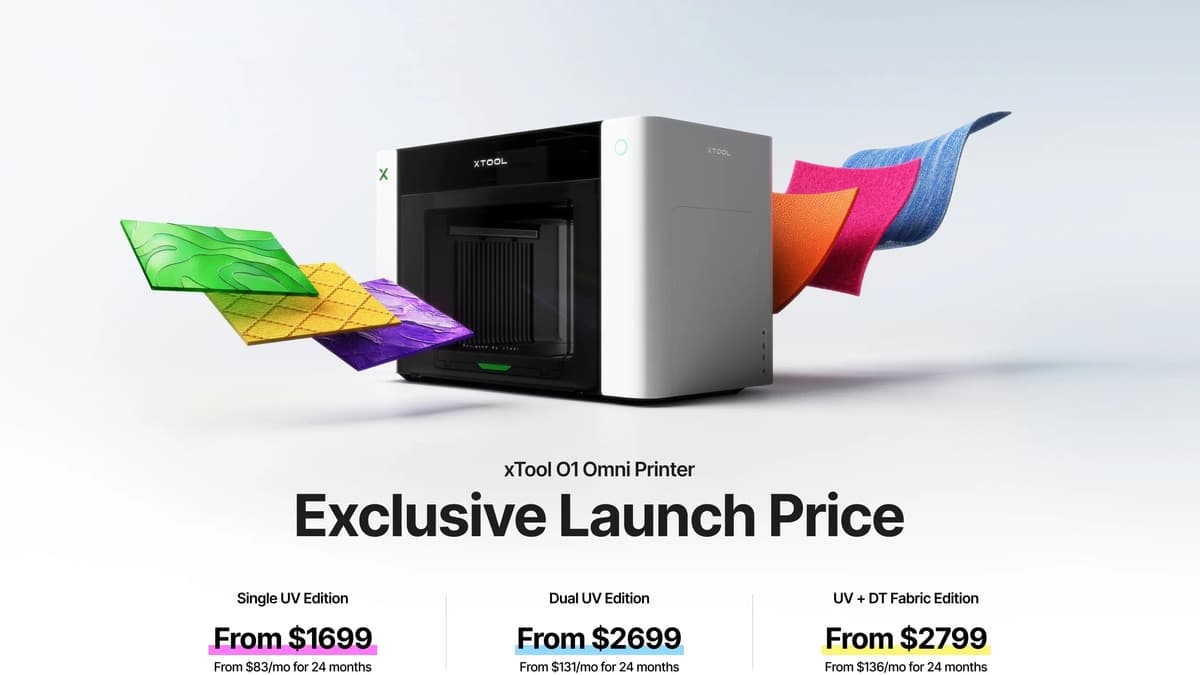
xTool O1 Omni preorder prices by edition.

Start with the machine lane, then check the live offer. The public O1 Omni page separates the printer into three editions with different production paths: entry UV hard goods, dual-head UV effects, and apparel-capable UV + DT Fabric.

Single UV Edition$1,699$2,499 MSRP · preorder price
Dual-Head UV Edition$2,699$3,299 MSRP · preorder price
UV + DT Fabric Edition$2,799$3,499 MSRP · preorder price
Disclosure: some links on this page are affiliate links. If you buy through them, I may earn a commission at no extra cost to you.
Official xTool launch image used as the hero sceneThree editions · $50 deposit · $459 bonus

Three editions

Three public editions, three very different buyer paths.

Apparel + hard goods

UV + DT Fabric Edition

$2,799 pre-order / $3,499 MSRP

The widest lane. Start here if the shop plan includes shirts, totes, cotton, polyester, or blended fabric products alongside hard goods.

Best for
Creators with both apparel and hard-goods printing needs.
Print head
Two Epson F1080 printheads
Work area
Standard bed 13" x 4.8" / large bed 13" x 16.5" / DTG platen 11.8" x 15.4".
Ink
UV: CMYKWV / DT Fabric: CMYKWW
Materials
Acrylic, wood, metal, cotton, polyester, and other rigid or fabric work.
Resolution
720x1440 dpi print / 1440 x 1200 dpi vision
Check current offer
Fast hard goods

Dual-Head UV Edition

$2,699 pre-order / $3,299 MSRP

The effects lane. The dual-head ink system is the headline, but ink cost and maintenance will decide the real business case.

Best for
Creators focused on higher productivity and neon/flexible ink options.
Print head
Two Epson F1080 printheads
Work area
Standard bed 13" x 4.8" / large bed 13" x 16.5".
Ink
CMYKWV + RW/FW/FR/FY. xTool defines these as rigid white, flexible white, fluorescent red, and fluorescent yellow.
Materials
Acrylic, leather, wood, canvas, and other rigid/flexible blanks.
Resolution
720x1440 dpi print / 1440 x 1200 dpi vision
Check current offer
Entry UV

Single UV Edition

$1,699 pre-order / $2,499 MSRP

The clean entry lane. Watch this one if the goal is flatbed UV personalization without apparel or the dual-head ink system.

Best for
Entry-level makers focused on rigid material personalization.
Print head
One Epson F1080 printhead
Work area
Standard bed 13" x 4.8" / large bed 13" x 16.5".
Ink
CMYKWV
Materials
Acrylic, wood, metal, glass, ceramic, and other basic rigid blanks.
Resolution
720x1440 dpi print / 1440 x 1200 dpi vision
Check current offer

Reader pulse

Tell us which O1 Omni edition you are considering.

This is the quick check I want from readers right now: which edition looks closest to your shop, what would you use it for, and what still makes you hesitate. I will use the aggregate answers to decide which O1 Omni tests, comparisons, and cost checks move to the front of the line.

Still comparingI am not sure yet

That is useful too. The undecided answers tell me which proof points need to move higher on the page as xTool and early users publish more evidence.

Which edition are you considering?
Check xTool's live offer

Email is optional. Anonymous responses are used in aggregate to shape the next buyer checks; email responses may receive the O1 update if you choose the checkbox.

Current facts

Currently available information.

On small screens, scroll sideways to compare all three editions.

xTool O1 Omni edition comparison from the public campaign page, checked June 29, 2026. Pre-order prices and MSRP are shown together; verify the final checkout total on xTool before paying.
SpecUV + DT FabricDual-Head UVSingle UV
Best forApparel + hard goodsHigh-productivity UV and neon/flexible ink effectsEntry rigid-material personalization
Print headsEpson F1080 x2Epson F1080 x2Epson F1080 x1
Print resolution720x1440 dpi720x1440 dpi720x1440 dpi
Ink channelsUV CMYKWVDT / Fabric CMYKWWCMYKWV + RW/FW/FR/FYCMYKWV
Ink capacity125 ml standard ink / 290 ml high-capacity white125 ml standard ink / 290 ml high-capacity white125 ml standard ink
Material laneRigid + fabricRigid + flexibleBasic rigid
Vision system resolution1440 x 1200 dpi1440 x 1200 dpi1440 x 1200 dpi
Large print bed330 x 420 mm330 x 420 mm330 x 420 mm
Fabric platen300 x 390 mmNot listedNot listed
Safety notesNon-reprotoxic / GREENGUARD / OEKO-TEX DT Fabric inkNon-reprotoxic / GREENGUARDNon-reprotoxic / GREENGUARD
Price$2,799 pre-order / $3,499 MSRP$2,699 pre-order / $3,299 MSRP$1,699 pre-order / $2,499 MSRP

Feature watch

The features worth tracking are now specific.

Workflow

Laser Meets Printer

xTool says O1 Omni and an xTool laser can connect in the same software, so one design can split into a full-color print step and a laser-cut outline step.

Alignment

Pixel-Scan Vision System

xTool says Pixel-Scan combines full-area laser sensing with CIS imaging to capture 1:1 object data without camera distortion, including full-bed and oversized-item placement.

Maintenance

SmartCycle 2.0

xTool says SmartCycle 2.0 combines automatic white ink stirring, circulation, and a Smart Hydration System so the printer can restart after weeks of downtime.

Expansion

Roll Feeder + Laminator

The public page says the Roll Feeder + Laminator can print up to 49 ft of UV DTF transfers and up to 39 ft of canvas or adhesive vinyl graphics.

Texture

7 mm embossed print height

All three public model columns list 7 mm / 0.28 in embossed print height, 720x1440 dpi print resolution, 1440 x 1200 dpi vision resolution, and plus/minus 0.2 mm positioning accuracy.

Drinkware

Rotary preview for cups

xTool says its Rotary Attachment supports 90% of cups and tumblers with real-time 3D preview for placement.

Pricing watch

The deposit is live. The checkout still needs a careful read.

xTool's public page now gives the model lanes, printhead count, print resolution, ink channels, ink capacity, material targets, bed sizes, safety notes, a $50 refundable deposit, and a $459 gift bundle. It also adds the Laser Meets Printer workflow for O1-to-xTool-laser print-and-cut jobs. The launch image also shows early-bird pricing by edition, and xTool confirmed the MSRP spread to The Crafty Catsman. The final checkout total, taxes, shipping, and bundle contents still belong on xTool's live page.

xTool O1 Omni public deposit image showing $50 deposit and $459 exclusive gifts

Before paying the deposit, check:

  • Whether the final checkout matches the public pre-order price
  • How long the early-bird price remains available before MSRP applies
  • Deposit refund language and final-payment deduction
  • Shipping timing; xTool says shipping may start as early as August 2026
  • Ink, maintenance, accessory, and bundle pricing
Check xTool's live offer

Next reads

Use the full UV cluster before you decide.

Launch FAQ

Fast answers before the click.

What are the three xTool O1 Omni editions?

xTool's public campaign page lists UV + DT Fabric Edition, Dual-Head UV Edition, and Single UV Edition. The first is the apparel plus hard-goods path, the second is the faster dual-head UV path, and the third is the entry rigid-material UV path.

Are xTool O1 Omni prices public yet?

Yes. xTool confirmed the early-bird pre-order and MSRP spread to The Crafty Catsman: UV Edition is $1,699 pre-order / $2,499 MSRP, Dual-Head UV Edition is $2,699 pre-order / $3,299 MSRP, and UV + Fabric Edition is $2,799 pre-order / $3,499 MSRP. I still recommend verifying the final checkout total, taxes, shipping, and bundle contents on xTool's page before paying.

What does the $50 xTool O1 Omni deposit include?

xTool says the $50 deposit secures the early-bird preorder price, is refundable before final purchase, is deducted from the final machine purchase price, and unlocks a $459 bonus package. The bonus package shown publicly includes BatchFlow Jig, three 20% off ink coupons, and 3,000 Atomm credits.

Which O1 Omni edition should a shirt or apparel seller watch?

Start with the UV + DT Fabric Edition. The public xTool table specifically positions that model for creators with both apparel and hard-goods printing needs, with a DTG platen and DT Fabric ink path listed alongside UV printing.

Does xTool publish O1 Omni speed by edition?

xTool's current rendered public spec table does not show an edition-by-edition speed row. Treat speed and real throughput as proof points to verify after launch, especially if you are choosing between Single UV and Dual-Head UV for production work.

What is the Laser Meets Printer feature?

Laser Meets Printer is xTool's final O1 Omni feature reveal. xTool says O1 Omni and a compatible xTool laser can connect in the same software so one design can be split between color printing on the O1 and outline cutting on the laser.

What should still be verified before buying?

Verify final checkout totals, taxes, shipping timing, ink prices, cleaning and maintenance costs, accessory pricing, what ships in each bundle, and whether the blank types you sell match the edition you choose.

Can I tell The Crafty Catsman which O1 Omni edition I am considering?

Yes. This page includes a short optional reader survey for the UV + DT Fabric Edition, Dual-Head UV Edition, Single UV Edition, and undecided buyers. I use those responses in aggregate to decide which O1 Omni comparisons, cost checks, and hands-on questions should move higher in the coverage.