
xTool P3 vs Glowforge Pro
The real question is not which laser has the nicer spec sheet. It is whether you need a production workshop machine or a guided creative appliance.

Quick Verdict
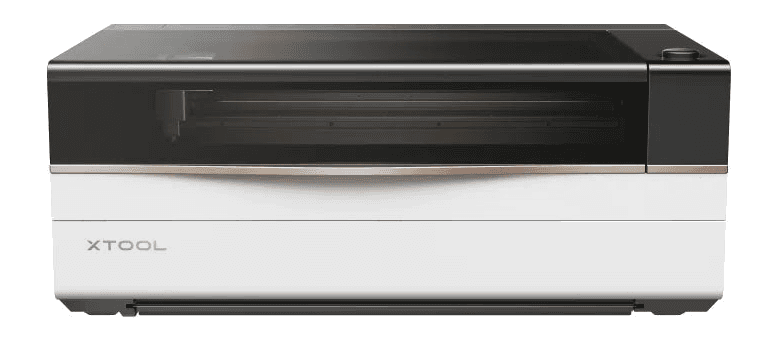
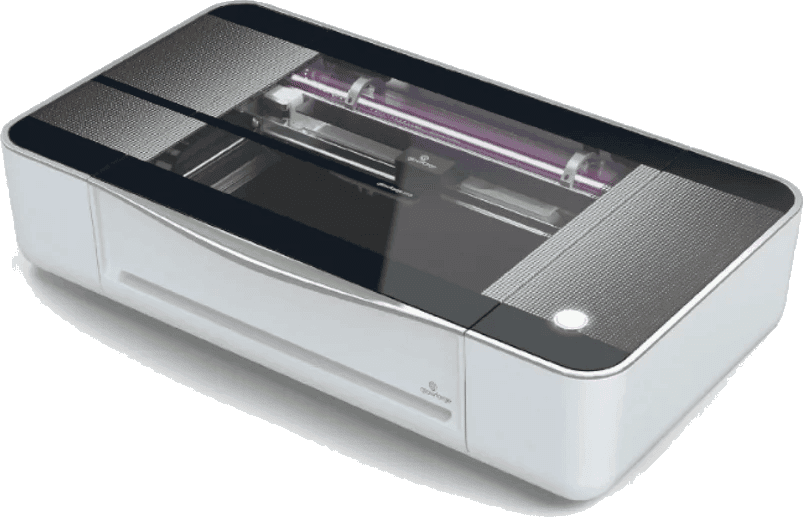
For most production-minded makers in 2026, the xTool P3 is the stronger buy: 80W power, 1200mm/s speed, a larger 36 x 18 inch class work area, Class 1 safety positioning, AutoLift, LiDAR, and built-in fire suppression. Glowforge Pro still fits users who want the simplest cloud-first workflow.
Affiliate disclosure: xTool links may earn us a commission at no added cost to you. Recommendations stay tied to specs, workflow fit, and real buyer use cases.
The P3 has more cutting headroom for thicker stock and repeated production runs.
The gap matters when you are batching signs, gifts, templates, or event inventory.
The P3 enclosure and built-in fire suppression are the more modern workshop posture.
The P3 is the better machine when time matters.
Glowforge still deserves respect for making lasers feel approachable, but the P3 changes the comparison by moving the conversation from easy first cuts to repeatable workshop output.
xTool P3
Choose the P3 if your laser needs to earn its keep through bigger layouts, faster batches, thicker materials, stronger automation, and more control over software and sourcing.
Check the current P3 offerGlowforge Pro
Consider Glowforge Pro if your priority is a polished guided app, smaller creative projects, and a cloud workflow that does more hand-holding than a production platform.
Check Glowforge availabilityTwo machines, two very different promises.
xTool is selling a faster, larger, more automated production route. Glowforge is selling an easier guided experience with a familiar cloud-first workflow.
xTool P3
The P3 is built for people who expect a laser to become a throughput tool, not just a guided creative appliance.
- 80W CO2 laser power
- 1200mm/s max motion speed
- Motorized AutoLift and LiDAR focusing workflow
- Class 1 positioning with built-in fire suppression
- xTool Creative Space plus LightBurn flexibility
Glowforge Pro
Glowforge Pro still has a friendly guided workflow, but its hardware class now feels older against the P3.
- 45W CO2 laser rating
- Approx. 19.5 x 11 inch working area
- Pro passthrough for long thin material
- Class 4 device with more operator precautions
- Simple cloud software with internet dependency
The table only matters when it changes your workflow.
The gap is not just wattage. It is bed size, automation, safety posture, software control, and whether the machine can keep up after the first exciting week.
| Decision point | xTool P3 | Glowforge Pro | Why it matters |
|---|---|---|---|
| Laser power | 80W CO2 | 45W CO2 | The P3 has the stronger production ceiling for thicker material and repeated cuts. |
| Max listed speed | 1200mm/s | ~141mm/s | Speed claims do not replace testing, but the class difference is not subtle. |
| Work area | About 36 x 18 in | About 19.5 x 11 in | The P3 is better suited to larger panels and batch layouts. |
| Safety posture | Class 1 positioning | Class 4 Pro device | Glowforge Pro passthrough capability comes with a more demanding safety profile. |
| Focus and setup | AutoLift, LiDAR, camera workflow | Guided cloud setup | Glowforge is approachable; P3 automates more of the physical setup work. |
| Rotary work | Smart RA3 path | Optional add-on path | The P3 ecosystem is more production-oriented for cups, tumblers, and cylinders. |
| Fire safety | Built-in suppression | Operator monitoring required | No laser is set-and-forget, but built-in mitigation changes the risk conversation. |
| Software model | xTool Creative Space and LightBurn path | Cloud-first Glowforge app | Glowforge wins for guided simplicity; xTool wins for control and offline flexibility. |
| Buying price | Check live P3 bundle price | Check current Glowforge listing | Pricing shifts with bundles, sales, and rebuilt inventory, so do not buy from an old table alone. |
The right choice depends on how you repeat work.
The P3 is not just a faster Glowforge. It is a different operating model. That matters if you are planning inventory, custom orders, classroom use, or a mixed-material shop.
Batch production
If you sell repeatable products, the larger work area, higher wattage, and faster motion let you think in batches instead of one-off jobs.
Guided creative work
If you want the shortest path from design upload to first cut, Glowforge still has one of the easiest guided software flows.
Material freedom
The P3 is a better fit if you want to source your own sheets, tune your own settings, and grow into LightBurn.
Classroom simplicity
Glowforge can make sense where a simple interface matters more than wattage, speed, automation, or long-term software flexibility.
Check live manufacturer pages before you buy.
Prices, bundles, accessories, and refurbished inventory move. The comparison above is built around durable machine differences, then points you back to current listings for final purchase math.
Common questions before choosing a CO2 laser.
These answers are intentionally practical: speed, safety, setup, materials, and the tradeoff between guided simplicity and production control.
Yes. The P3 lists a maximum speed of 1200mm/s, while the older Glowforge Pro class is commonly discussed around 141mm/s. Combined with the P3's 80W power versus Glowforge Pro's 45W tube, the P3 is much better positioned for repeated production jobs.
The main advantages are power, speed, working area, automation, and safety posture. The P3 combines an 80W CO2 tube, 1200mm/s motion speed, AutoLift, LiDAR, Class 1 positioning, and built-in fire suppression. It also has a larger work area and a stronger accessory path.
The P3 can be paired with an optional 5W infrared module intended for direct metal and plastic marking. A standard CO2 laser can mark some metals only with marking compounds, so this accessory changes what the P3 ecosystem can cover.
Glowforge is still one of the friendliest beginner workflows because its app is highly guided and cloud based. The tradeoff is that you give up some control, offline flexibility, speed, working area, and production headroom compared with the P3.
That depends on your material sourcing, tube replacement, filter setup, accessory choices, and how much you rely on closed ecosystem materials. The xTool path is generally more open for material sourcing and LightBurn-style tuning, while Glowforge leans into a more guided materials ecosystem.