
xTool P3 vs Glowforge Pro
The real question is not which laser has the nicer spec sheet. It is whether you need a production workshop machine or a guided creative appliance.

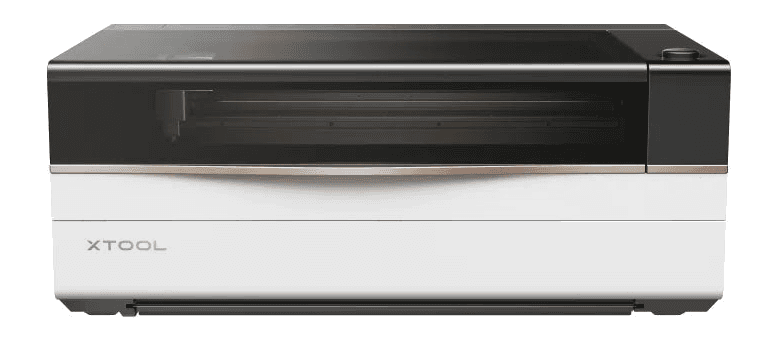
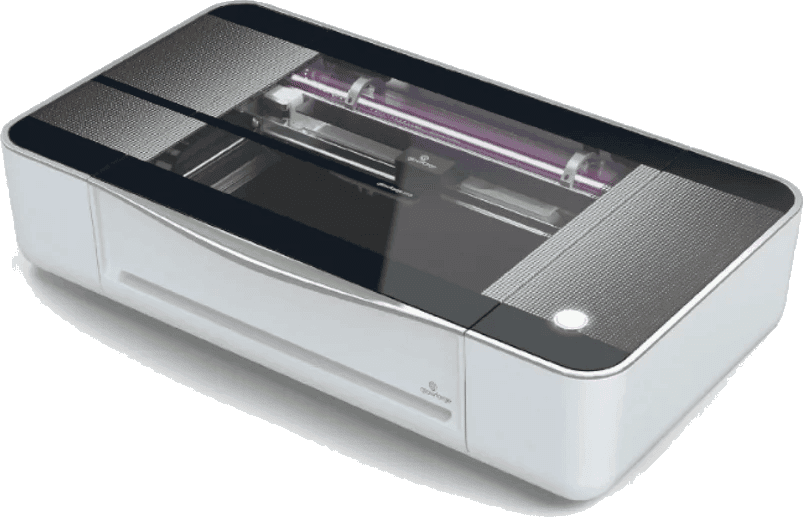
Quick Verdict
Between xTool and Glowforge in 2026, xTool's CO2 lasers lead on paper: the 80W xTool P3 lists 1200mm/s, a 36 x 18 inch class work area, Class 1 positioning and built-in fire suppression. The 45W Glowforge Pro is now sold only Certified Rebuilt (checked September 22, 2026) and still suits makers who want the simplest cloud-first workflow.
Affiliate disclosure: xTool links may earn us a commission at no added cost to you. Recommendations stay tied to specs, workflow fit, and real buyer use cases.
The P3 has more cutting headroom for thicker stock and repeated production runs.
Glowforge rates the Pro only against its own entry Spark (10x its top speed), so time a real batch before trusting either claim.
The P3 enclosure and built-in fire suppression are the more modern workshop posture.
The P3 is the better machine when time matters.
Glowforge still deserves respect for making lasers feel approachable, but the P3 changes the comparison by moving the conversation from easy first cuts to repeatable workshop output.
xTool P3
Choose the P3 if your laser needs to earn its keep through bigger layouts, faster batches, thicker materials, stronger automation, and more control over software and sourcing.
Check the current P3 offerGlowforge Pro
Consider Glowforge Pro if your priority is a polished guided app, smaller creative projects, and a cloud workflow that does more hand-holding than a production platform.
Check Glowforge availabilityTwo machines, two very different promises.
xTool is selling a faster, larger, more automated production route. Glowforge is selling an easier guided experience with a familiar cloud-first workflow.
xTool P3
The P3 is built for people who expect a laser to become a throughput tool, not just a guided creative appliance.
- 80W CO2 laser power
- 1200mm/s max motion speed
- Motorized AutoLift and LiDAR focusing workflow
- Class 1 positioning (Class 4 with the conveyor feeder) and built-in fire suppression (CO₂ cylinder sold separately)
- xTool Studio on a PC (xTool says LightBurn is not supported)
Glowforge Pro
Glowforge Pro still has a friendly guided workflow, but its hardware class now feels older against the P3.
- 45W CO2 laser rating
- No longer sold new — Certified Rebuilt only; the Pro HD is the current new 45W model (checked September 22, 2026)
- Approx. 19.5 x 11 inch working area
- Pro passthrough for long thin material
- Class 4 device with more operator precautions
- Simple cloud software with internet dependency
xTool vs Glowforge: where the P2S, P3 and Glowforge Pro stand in 2026
xTool's P2S and P3 CO2 lasers beside the Glowforge Pro, from each maker's own pages. Each status line carries the date that machine was last checked.
| Machine | Power | Work area | Max speed | Rotary | Software | Status |
|---|---|---|---|---|---|---|
| xTool P2SxTool P2S vs Glowforge Pro comparison | 55W | 23.6 × 12 in (600 × 305 mm) | 600 mm/s; 6,400 mm/s² X accel | Not included — separate rotary (RA3 for P2S/P2); rotary diameter 3–50 mm without the Riser Base, 0–180 mm with it | xTool Studio (free); Windows / macOS | Pre-order · xTool: "Estimated shipping from late October" (checked October 11, 2026; it said early October on September 22) |
| xTool P3 | 80W | 36 × 18 in (915 × 458 mm) — "2.3x larger than P2S" | 1,200 mm/s; 19,600 mm/s² X accel | Not included — RA3 separate; autofocus only works with RA3 | xTool Studio (PC) ONLY | Current flagship · in stock (xTool: "ships in 3-5 business days")Checked October 11, 2026 |
| Glowforge Pro | 45W | 11 × 19.5 in cutting area; 20 in wide material | No mm/s figure published | None — Glowforge does not sell a rotary; round objects fit only if 2 in or shorter lying on their side | Web-based Glowforge app; internet needed to start every print (a print in progress finishes if the connection drops) | No longer sold new — Certified Rebuilt only; the Pro HD is the current new 45W modelChecked September 22, 2026 |
The table only matters when it changes your workflow.
The gap is not just wattage. It is bed size, automation, safety posture, software control, and whether the machine can keep up after the first exciting week.
| Decision point | xTool P3 | Glowforge Pro | Why it matters |
|---|---|---|---|
| Laser power | 80W CO2 | 45W CO2 | The P3 has the stronger production ceiling for thicker material and repeated cuts. |
| Max listed speed | 1200mm/s | No mm/s figure published; Glowforge rates the Pro at 10x its Spark (Pro HD 12x) | Speed claims do not replace testing, and these two are not measured the same way. |
| Work area | About 36 x 18 in | About 19.5 x 11 in | The P3 is better suited to larger panels and batch layouts. |
| Safety posture | Class 1 positioning; Class 4 with the conveyor feeder | Class 4 Pro device | Glowforge Pro passthrough capability comes with a more demanding safety profile. |
| Focus and setup | AutoLift, LiDAR, camera workflow | Guided cloud setup | Glowforge is approachable; P3 automates more of the physical setup work. |
| Rotary work | RA3 rotary, sold separately | No Glowforge rotary; round items only if 2 in or shorter, lying on their side | The P3 ecosystem is more production-oriented for cups, tumblers, and cylinders. |
| Fire safety | Built-in suppression (CO₂ cylinder sold separately) | Operator monitoring required | No laser is set-and-forget, but built-in mitigation changes the risk conversation. |
| Software model | xTool Studio on a PC; no LightBurn support | Cloud-first Glowforge app | Glowforge wins for guided simplicity; xTool wins for control and offline flexibility. |
| Buying price | Check live P3 bundle price | Certified Rebuilt only (checked September 22, 2026); check Glowforge's current listing | Pricing shifts with bundles, sales, and rebuilt inventory, so do not buy from an old table alone. |
The right choice depends on how you repeat work.
The P3 is not just a faster Glowforge. It is a different operating model. That matters if you are planning inventory, custom orders, classroom use, or a mixed-material shop.
Batch production
If you sell repeatable products, the larger work area, higher wattage, and faster motion let you think in batches instead of one-off jobs.
Guided creative work
If you want the shortest path from design upload to first cut, Glowforge still has one of the easiest guided software flows.
Material freedom
The P3 is a better fit if you want to source your own sheets and tune your own settings. Plan to do that in xTool Studio: xTool says the P3 does not support LightBurn.
Classroom simplicity
Glowforge can make sense where a simple interface matters more than wattage, speed, automation, or long-term software flexibility.
Check live manufacturer pages before you buy.
Prices, bundles, accessories, and refurbished inventory move. The comparison above is built around durable machine differences, then points you back to current listings for final purchase math.
Common questions before choosing a CO2 laser.
These answers are intentionally practical: speed, safety, setup, materials, and the tradeoff between guided simplicity and production control.
Probably, but there is no like-for-like number. xTool lists a 1200mm/s maximum speed for the P3. Glowforge does not publish a speed in mm/s; it rates the Pro at 10x and the Pro HD at 12x the top speed of its entry-level Spark. Combined with the P3's 80W power versus the Glowforge Pro's 45W tube, the P3 is better positioned for repeated production jobs, but only the same job timed on both machines would show how much faster it finishes. Glowforge now sells the Pro only Certified Rebuilt; its current new 45W model is the Pro HD (checked September 22, 2026).
The main advantages are power, speed, working area, automation, and safety posture. The P3 combines an 80W CO2 tube, 1200mm/s motion speed, AutoLift, LiDAR, Class 1 positioning (Class 4 with the conveyor feeder), and built-in fire suppression (the CO₂ cylinder is sold separately). It also has a larger work area and a stronger accessory path.
The P3 can be paired with an optional 5W infrared module intended for direct metal and plastic marking. A standard CO2 laser can mark some metals only with marking compounds, so this accessory changes what the P3 ecosystem can cover.
Glowforge is still one of the friendliest beginner workflows because its app is highly guided and cloud based. The tradeoff is that you give up some control, offline flexibility, speed, working area, and production headroom compared with the P3.
That depends on your material sourcing, tube replacement, filter setup, accessory choices, and how much you rely on closed ecosystem materials. The xTool path is generally more open for material sourcing and your own setting tests, while Glowforge leans into a more guided materials ecosystem.