
CO₂ laser buyer guide · 2026
CO₂ laser cutters: xTool, OMTech and the alternatives
For a larger bed and more automation, compare xTool P3. For desktop work, compare P2S’s placement tools with Polar 2’s RF and glass-tube options. Glowforge offers guided cloud software; Thunder is another RF option. Gweike Cloud/NOX remains a regional-listing watchlist item here.
Researched buyer guide · No head-to-head performance test · Updated 2026-10-19

Direct answer
Start with bed size, software and cooling.
Compare xTool P3 when its larger bed and automation suit your work and installation space. Its stated standalone enclosure classification depends on the operating configuration. Compare xTool P2S for desktop camera placement without the P3 footprint. Compare OMTech Polar 2 RF when its source, cooling and larger bed fit your work. Its current package lists LightBurn and a basic rotary; P2S also has a new LightBurn 2.2 network path marked Labs. Try Glowforge for a guided cloud workflow in a shared workshop. Treat Thunder Bolt as the RF shop alternative and Gweike Cloud/NOX as a budget watchlist pick that needs a fresh support and availability check.
Larger bed and automation
Compare P3 when those features match your work.
Smaller desktop option
xTool P2S is easier to fit than P3.
RF source choice
Polar 2 RF adds air cooling and a larger desktop bed; check its dated package.
Do not miss
None of these CO2 lasers cut bare metal.
Three places to start
Which models fit your work and workshop?
Begin with the size of your work, then compare how you place each design and cool the source. These recommendations use published features, not measured job-time rankings.


Manufacturer hardware images over illustrative material texture. The full comparison below also covers Polar 2 glass, Glowforge, Thunder and the regional Gweike listing.
For larger parts or repeated batches, compare P3.
P3 lists 80W CO2 power, a larger bed, built-in lift and automated features. We would compare it when those features solve a recurring limitation in the shop. Published maximum motion speed does not tell us how much time it saves on a finished job. Read the P3 guide.
- CO₂ source
- 80W
- Work area
- 36 × 18 in
For a smaller camera-led setup, compare P2S.
We would compare P2S for desktop work that uses its camera-placement tools and CO2 material range. Check the package and footprint, and try the placement workflow with your own designs. Compare the xTool models.
For air-cooled RF, compare Polar 2.
Polar 2 RF offers an air-cooled source and a bigger desktop bed. Its current package lists LightBurn and a basic rotary; filtration is separate and usable pass-through remains unconfirmed. Read the Polar guide for RF, glass and Lite package choices. Compare the Polar packages or explore the OMTech range.
The contenders
Compare seven CO₂ options.
Check which machines can handle your materials and blank sizes, then compare software, setup, maintenance and ventilation.
Affiliate disclosure: some product links are affiliate links. They may earn The Crafty Catsman a commission at no extra cost to you.
xTool
xTool P3
- Power
- 80W
- Work area
- 36 × 18 in (915 × 458 mm) — "2.3x larger than P2S"
Best for: Small business throughput, large acrylic/wood work, batch jobs, enclosed production under the specified operating configuration
Before choosing: No LightBurn support. Confirm the operating configuration and budget for optional handling and IR accessories.
Software, published speed and full buying caveats
- Published motion speed
- 1,200 mm/s; 19,600 mm/s² X accel
- Software
- xTool Studio (PC) ONLY
No LightBurn support: xTool lists it as unsupported, and LightBurn's June 29, 2026 notice says recent xTool firmware removed P3 support. Optional IR, conveyor, rotary, honeycomb, and CO2 suppression cylinder change the final budget.
OMTech
OMTech Polar 2 RF
- Power
- 50W
- Work area
- 28 × 14 in (710 × 360 mm)
Best for: Buyers who want an air-cooled RF source, a larger desktop bed and a package currently listing a LightBurn license and basic rotary.
Before choosing: Filtration is separate; pass-through remains unconfirmed. Follow the manual’s operating classification. Source-life estimates are not warranty terms.
Software, published speed and full buying caveats
- Published motion speed
- 2,000 mm/s engrave (X); 500 mm/s Y per manual
- Software
- OMTech's current package lists "LightBurn Software" as an included item; RDWorks V8 compatible
Filtration is separate. The FAQ says no pass-through; manual door language conflicts. The manual describes a Class I product used as instructed and a Class 4 embedded laser. Source-life estimates are not warranty terms.
OMTech
OMTech Polar 2 Glass
- Power
- 70W
- Work area
- 28 × 14 in (710 × 360 mm)
Best for: Budget-stretched buyers who prefer a stronger cutting wattage and accept consumable glass-tube economics.
Before choosing: Water cooling and a consumable glass tube affect ownership cost. Source-life estimates are conditional; pass-through remains unconfirmed.
Software, published speed and full buying caveats
- Published motion speed
- 1,200 mm/s engrave (X); 12,000 mm/s² accel claim
- Software
- OMTech's current package lists "LightBurn Software" as an included item; RDWorks V8 compatible
The glass tube is consumable and water cooled. The manual’s source-life estimates fall sharply at higher power; those figures are not a warranty or our measured results. Confirm package, ventilation and the unresolved pass-through details.
xTool
xTool P2S
- Power
- 55W
- Work area
- 23.6 × 12 in (600 × 305 mm)
Best for: Design-heavy shops, camera placement, curved engraving, compact premium desktop workflows
Before choosing: LightBurn 2.2 needs current firmware and is marked Labs; the older firmware warning remains published. Budget for accessories.
Software, published speed and full buying caveats
- Published motion speed
- 600 mm/s; 6,400 mm/s² X accel
- Software
- xTool Studio (free); Windows / macOS
LightBurn needs 2.2.00 or later on current firmware: xTool's notice (updated October 10, 2026) points the P2S to LightBurn 2.2.00 or later over the network after its latest online firmware, and LightBurn made 2.2.00 its official release on October 19, 2026 with P2S support marked as a Labs feature; LightBurn's June 29, 2026 notice still advises holding off on firmware updates. Budget for riser, rotary, conveyor, honeycomb, and air handling as needed.

Thunder Laser
Thunder Bolt
- Power
- 30W standard / 60W option
- Work area
- 20 × 12 in (508 × 305 mm)
Best for: Buyers comparing RF source, LightBurn, US support, pass-through workflow, and a more conventional laser-shop experience.
Before choosing: Official US and global pages conflict on speed, acceleration and resolution claims.
Software, published speed and full buying caveats
- Published motion speed
- 1,500 mm/s (Thunder's US shop page and user manual); 2,000 mm/s (Thunder's global site comparison table)
- Software
- LightBurn INCLUDED (tier not stated); RDWorks/LaserMaker compatible
The official US and global pages disagree on some speed, acceleration, and resolution claims, so read the source notes before treating any one number as absolute.
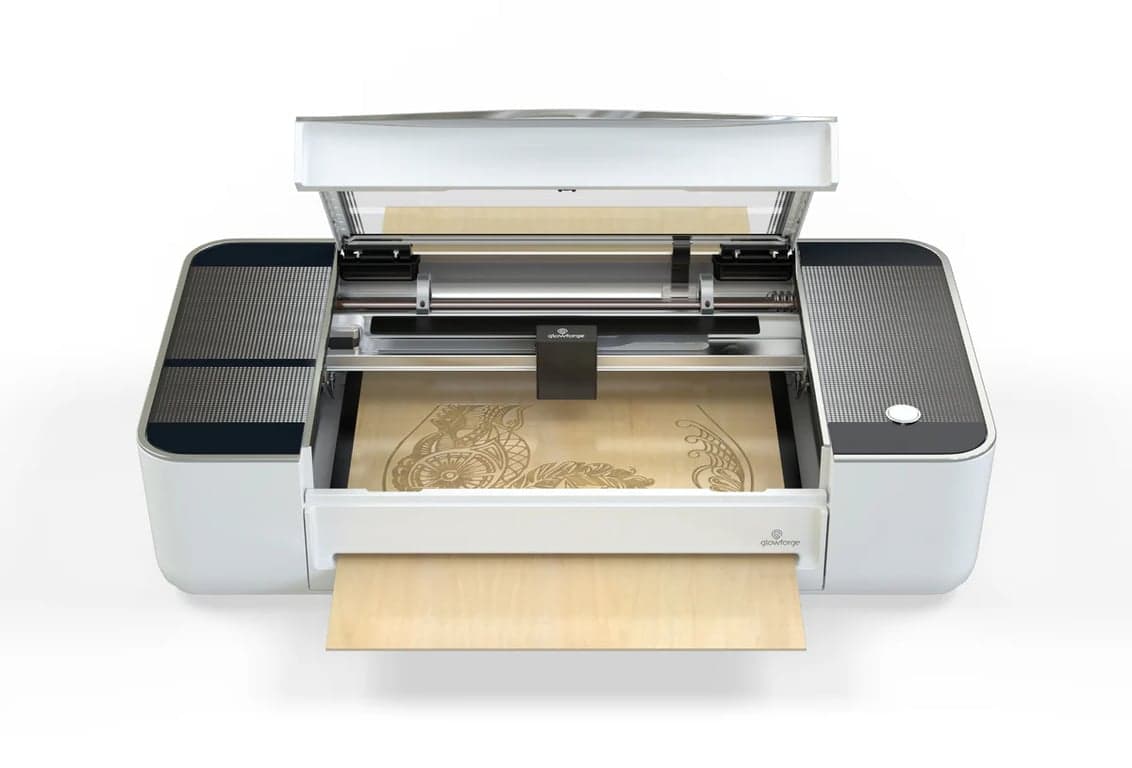
Glowforge
Glowforge Pro / Pro HD
- Power
- 45W
- Work area
- 11 × 19.5 in cutting area; 20 in wide material
Best for: Schools, libraries, design clubs, and teams that prize a guided cloud workflow over raw specs
Before choosing: The 45W Pro is sold rebuilt; warranty terms conflict. A cloud connection remains part of the workflow.
Software, published speed and full buying caveats
- Published motion speed
- Not documented by manufacturer
- Software
- Web-based Glowforge app; internet needed to start every print (a print in progress finishes if the connection drops)
The 45W Pro is no longer the new-unit flagship. The rebuilt listing still contradicts itself on warranty length, and cloud dependency remains part of the decision.
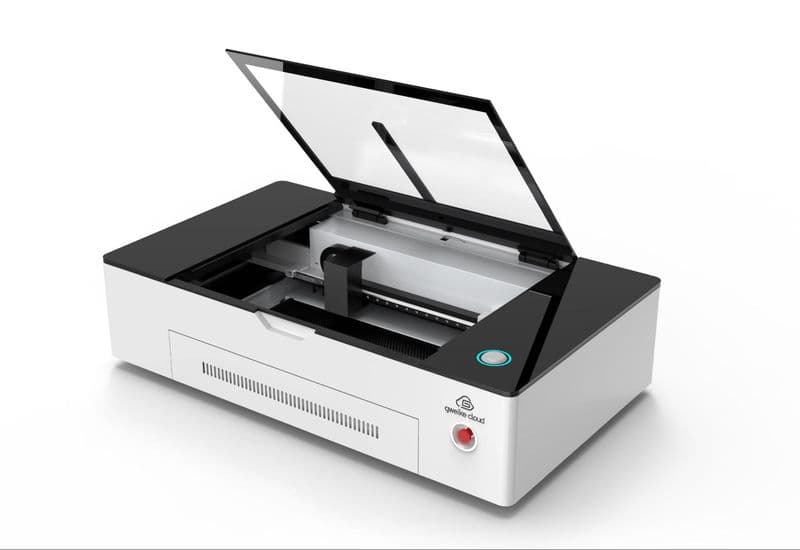
Gweike
Gweike Cloud / NOX
- Power
- 50W CO2 on NOX official regional page
- Work area
- 20.08 x 11.8 in. / 510 x 300 mm on NOX official regional page
Best for: Price-sensitive hobbyists who can tolerate more due diligence before purchase
Before choosing: Regional-listing watchlist only. Confirm the exact US model, availability, support, returns and parts.
Software, published speed and full buying caveats
- Published motion speed
- Not checked yet
- Software
- LightBurn compatibility claimed on NOX official regional page
The US Cloud/NOX model was not part of this guide's September check. Confirm the exact model, availability, support, returns and parts before ordering.
Side-by-side
Specs tell you where each machine belongs.
Compare the manufacturer specifications, then use the table below to match those features to your work. For the standalone source table, open the laser cutter spec registry.
Compare the full source-checked specification matrix
Source checks September 22 – October 19, 2026 · manufacturer data only
Polar 2 vs xTool P2S vs P3 vs Glowforge Pro vs Thunder Bolt: manufacturer-documented specs
Every number below comes from the manufacturer's own pages, manuals, and support docs — each cell links its source (). Where a manufacturer doesn't document something, we say not documented instead of guessing. Where a manufacturer contradicts itself, we say that too.
| Spec | OMTech Polar 250W RFRF package listed for sale; warehouse stock and delivery not verifiedChecked OMTech Polar 2 guide | OMTech Polar 270W GlassGlass package listed for sale; warehouse stock and delivery not verifiedChecked OMTech Polar 2 guide | xTool P2S55W CO2Pre-order · xTool: "Estimated shipping from late October" (checked October 11, 2026; it said early October on September 22)Checked xTool P2S guide | xTool P380W CO2Current flagship · in stock (xTool: "ships in 3-5 business days")Checked xTool P3 guide | Glowforge Pro45W CO2No longer sold new — Certified Rebuilt only; the Pro HD ($7,999) is the current new 45W modelChecked Glowforge Pro guide | Thunder Laser Bolt30W RF (60W option)Current · in stockChecked |
|---|---|---|---|---|---|---|
| Money | ||||||
| Price (checked) | $4,999.99 for the 50W RF Package, checked October 19, 2026↗ | $3,699.99 for the 70W CO₂ Package, checked October 19, 2026↗ | $2,999 Standalone (pre-order), checked October 11, 2026↗(paid link) | $6,999 Standalone, checked October 11, 2026↗(paid link) | $2,999 Certified Rebuilt, checked September 22, 2026↗ | $5,795 for 30W / $7,995 for 60W, checked September 22, 2026↗ |
| List / compare-at | $7,599.99 vendor compare-at (not verified MSRP)↗ | $5,199.99 vendor compare-at (not verified MSRP)↗ | $4,499 compare-at↗(paid link) | $6,999 (xTool's strikethrough price)↗(paid link) | $5,999 Glowforge reference price on its Certified Rebuilt page ("Save 50%"); not a current new-machine price↗ | Same as current price when checked↗ |
| Active promo | not documented | not documented | Ended: xTool's 6th Anniversary Sale ran September 14–October 4, 2026 ($200 off orders over $1,499 at checkout); check the product page for any current offer↗(paid link) | Ended: xTool's 6th Anniversary Sale ran September 14–October 4, 2026 ($700 off orders of $6,999+, $1,500 off $8,899+, at checkout); check the product page for any current offer↗(paid link) | With a referral: $2,499; $150 of Proofgrade materials included↗ | No discount when checked; financing from $114/mo shown on the shop page↗ |
| Engine | ||||||
| Laser source | RF metal CO2 tube, air-cooled↗ | DC glass CO2 tube, closed-loop water-cooled↗Maker's page now says (checked ): Glass CO2 tube, closed-loop water-cooled. OMTech's product page and manual both say "Glass Tube" with no further tube-type qualifier↗ | 55W glass CO2 tube, liquid-cooled (built-in tank and pump; user-filled antifreeze)↗(paid link) | CO2 tube (glass/RF construction not documented), 10.6 µm↗(paid link) | Custom CO2 glass tube, continuous operation at 10,600 nm↗ | RF metal CO2 tube (SPT on the 30W; tube maker not stated for the 60W option), air-cooled↗ |
| Power | 50W↗ | 70W↗ | 55W↗(paid link) | 80W↗(paid link) | 45W↗ | 30W standard / 60W option↗ |
| Tube life (as documented) | Manufacturer service-life estimates: 30,000/25,000/20,000 hrs at <40%/40–70%/>70% power; not a warranty or measured replacement interval↗ | Manufacturer service-life estimates: 10,000/6,500/1,500 hrs at <40%/40–70%/>70% power; consumable glass tube, not a warranty or measured replacement interval↗ | 6,000–8,000 hrs (xTool product-page FAQ); tube warrantied 6 months as a consumable↗(paid link) | ~10,000 hrs per FAQ; tube warrantied 6 months as wearing part↗(paid link) | not documented | 10,000+ hrs (global comparison table only)↗ |
| Max speed | 2,000 mm/s engrave (X); 500 mm/s Y per manual↗ | 1,200 mm/s engrave (X); 12,000 mm/s² accel claim↗ | 600 mm/s; 6,400 mm/s² X accel↗(paid link) | 1,200 mm/s; 19,600 mm/s² X accel↗(paid link) | not documented | 1,500 mm/s (Thunder's US shop page and user manual); 2,000 mm/s (Thunder's global site comparison table)↗ |
| Spot size | 0.07 mm (marketing copy; not in manual spec table)↗ | not documented | 0.15 × 0.15 mm↗(paid link) | 0.15 × 0.18 mm standard M lens (S/L optional; FAQ lists different values)↗(paid link) | not documented | not documented |
| Capacity | ||||||
| Work area | 28 × 14 in (710 × 360 mm)↗ | 28 × 14 in (710 × 360 mm)↗ | 23.6 × 12 in (600 × 305 mm)↗(paid link) | 36 × 18 in (915 × 458 mm) — "2.3x larger than P2S"↗(paid link) | 11 × 19.5 in cutting area; 20 in wide material↗ | 20 × 12 in (508 × 305 mm)↗ |
| Max material height | 4.53 in (115 mm)↗ | 4.92 in (125 mm)↗ | 71 mm (2.80 in) without tray; 64 mm with tray; 215 mm (8.46 in) with the separate Riser Base↗(paid link) | 220 mm manual mode / 180 mm auto mode↗(paid link) | 2 in tray removed / 0.5 in with tray↗ | 4.33 in (110 mm); 6.3 in with the included rotary tray↗ |
| Pass-through | FAQ says no openings; manual safety text mentions pass-through doors. Usable pass-through is not confirmed↗ | FAQ says no openings; manual safety text mentions pass-through doors. Usable pass-through is not confirmed↗ | None on the base machine; 118 in (3 m) lengths need the separate Automatic Conveyor Feeder plus rail kits (the Riser Base is required); max 14 mm thick↗(paid link) | No manual pass-through documented; the optional Intelligent Conveyor Feeder feeds stock through a front inlet: 60 in standard, up to 5 m with seven extra rail sets; conveyor use makes P3 Class 4↗(paid link) | Yes — Pro Passthrough: 1/4 in thick, 20 in wide, unlimited length↗ | Front pass-through door, unlimited length (513 mm width)↗ |
| Workflow | ||||||
| Camera | 16MP, ±1 mm positioning, full-bed view↗ | 16MP, ±1 mm positioning, full-bed view↗ | Dual 16MP (close-range + panoramic), 0.3 mm positioning↗(paid link) | 4-camera stack: 16MP SkyView panoramic + close-range + 2 side flame cams↗(paid link) | Dual cameras: lid wide-angle (±6 mm) + head macro (±0.1 mm); HD live view reserved for Pro HD↗ | Integrated bed camera (5MP per global site)↗ |
| Autofocus | Yes — one-touch↗ | Yes — one-touch↗ | Yes — LiDAR ranging; xTool's older P2/P2S LightBurn setup had no autofocus, and LightBurn says its 2.2 release (October 19, 2026) adds autofocus for P2 and P2S lasers with IR rangefinders as a Labs feature↗(paid link) | Yes + LiDAR ranging + motorized AutoLift base (16 kg capacity)↗(paid link) | Yes — laser height measurement, internal lens travel↗ | Yes — touch-pin autofocus + red dot↗ |
| Software | FREE LightBurn license included; RDWorks V8 compatible↗Maker's page now says (checked ): OMTech's current package lists "LightBurn Software" as an included item; RDWorks V8 compatible↗ | FREE LightBurn license included; RDWorks V8 compatible↗Maker's page now says (checked ): OMTech's current package lists "LightBurn Software" as an included item; RDWorks V8 compatible↗ | xTool Studio (free); Windows / macOS↗(paid link) | xTool Studio (PC) ONLY↗(paid link) | Web-based Glowforge app; internet needed to start every print (a print in progress finishes if the connection drops)↗ | LightBurn INCLUDED (tier not stated); RDWorks/LaserMaker compatible↗ |
| LightBurn | Yes — free license bundled↗Maker's page now says (checked ): Yes — OMTech's current package lists "LightBurn Software" as an included item↗ | Yes — free license bundled↗Maker's page now says (checked ): Yes — OMTech's current package lists "LightBurn Software" as an included item↗ | LightBurn 2.2.00 or later on current firmware — xTool's notice (updated October 10, 2026) says the P2S connects to LightBurn 2.2.00 or later over the network after its latest online firmware, and LightBurn made 2.2.00 its official release on October 19, 2026 with P2S support marked as a Labs feature; LightBurn's notice dated June 29, 2026 still advises holding off on firmware updates. xTool lists 40.22.011 as the P2S update threshold and 40.22.010.03 as its USB downgrade version↗(paid link) | No — "Lightburn and XCS (mobile and iPad versions) are not supported"↗(paid link) | No — machine control only through the Glowforge app; replacing its software or firmware voids the warranty↗ | Yes — license included↗ |
| OS support | Windows/macOS/Linux via LightBurn↗ | Windows/macOS/Linux via LightBurn↗ | Windows / macOS↗(paid link) | Windows 10 64-bit / macOS 11+; no Linux/ChromeOS↗(paid link) | Runs in a web browser (internet required)↗ | not documented |
| Connectivity | USB / U-disk / Ethernet / Wi-Fi↗ | USB / U-disk / Ethernet / Wi-Fi↗ | USB-C / Wi-Fi (Ethernet appears only in xTool's comparison data and troubleshooting docs)↗(paid link) | USB / Wi-Fi (2.4G+5G) / BLE 5.1; no Ethernet documented↗(paid link) | Wi-Fi 2.4 GHz only; no Ethernet port↗ | Ethernet / USB cable / USB disk (global site); 1GB onboard memory↗ |
| Shop reality | ||||||
| Air assist | Built-in pump, 14–17 L/min↗ | Built-in pump, 14–17 L/min↗ | Built-in dual-cylinder pump, up to 200 kPa, software-adjustable↗(paid link) | Built-in dual-cylinder pump, 30 L/min, 200 kPa↗(paid link) | Internal, no external compressor↗ | Dual-stage air assist, pump included, digital flow meter; flow rate not published↗ |
| Cooling | Air-cooled — no water loop at all↗ | Integrated closed-loop water cooling, 4.3 L tank, auto-shutoff protection↗ | Built-in water cooling; user fills antifreeze + purified water↗(paid link) | Built-in water cooling + chiller, 1.2 L tank, user-filled↗(paid link) | Closed-loop internal cooling with solid-state thermoelectric cooling; operates at 60–81°F (16–27°C)↗ | Air-cooled — no chiller↗ |
| Exhaust / filtration | Duct fan and two 1.5 m pipes included (vent outdoors); filtration is separate. Confirm an appropriate exhaust or filtration setup for the actual workspace↗ | Duct fan and two 1.5 m pipes included (vent outdoors); filtration is separate. Confirm an appropriate exhaust or filtration setup for the actual workspace↗ | Built-in dual-fan exhaust (14,000 RPM); filter screens need cleaning every 4 hrs of continuous use; AP2 purifier separate↗(paid link) | No built-in fan — SafetyPro IF2 2.0 inline fan INCLUDED in box↗(paid link) | 4-in hose included (8 ft max run); Performance Filter $1,295 + $249 cartridges for windowless use↗ | Integrated exhaust; no filtration (Thunder Air 700 sold separately)↗ |
| Laser class | Manual: Class I product when used as instructed; embedded laser listed as Class 4 in its specification table↗ | Manual: Class I product when used as instructed; embedded laser listed as Class 4 in its specification table↗ | Class 4 on xTool's spec table; the same product page says P2S comes in Class 1 and Class 4 variants, and xTool's safety FAQ says Class 1 conditions apply only without the Riser Base; interlocks + AI fire detection↗(paid link) | Class 1 standalone (Class 4 with conveyor); 8 flame sensors + built-in CO2 fire suppression (gas cylinder sold separately)↗(paid link) | Class 4 because of the passthrough slots; Glowforge says the Pro Shields and in-app training create "Class 1 conditions"↗ | Class 1 fully enclosed; "FDA Class 1, CE" per global table; laser class with the pass-through door in use is not documented↗ |
| Rotary | Basic rotary axis INCLUDED in box↗ | Basic rotary axis INCLUDED in box↗ | Not included — separate rotary (RA3 for P2S/P2); rotary diameter 3–50 mm without the Riser Base, 0–180 mm with it↗(paid link) | Not included — RA3 separate; autofocus only works with RA3↗(paid link) | None — Glowforge does not sell a rotary; round objects fit only if 2 in or shorter lying on their side↗ | Rotary tray included; rotary attachment separate↗ |
| Footprint | 46.4 × 27.3 × 14.3 in↗ | 46.4 × 27.3 × 14.3 in↗ | 39.4 × 25.1 × 10.6 in↗(paid link) | 49.2 × 30.7 × 19.5 in (1250 × 780 × 496 mm); xTool's support FAQ lists 808 mm deep↗(paid link) | 38 × 20.75 × 8.25 in↗ | 37.0 × 28.5 × 19.6 in↗ |
| Weight | 220.5 lb (100 kg) net (manual)↗ | 216.1 lb (98 kg) net (manual)↗ | 99.2 lb (45 kg)↗(paid link) | 231.5 lb (105 kg); ships freight↗(paid link) | not documented | 77 kg (169.8 lb)↗ |
| Warranty | 2-yr machine; the product page lists a 24-month RF tube warranty (OMTech's warranty policy says 6 months for 40–60W tubes)↗ | 2-yr machine; glass tube only 12 months↗ | Main parts 12 mo; laser tube 6 mo (xTool's after-sales policy); reflector and focusing mirror 3 mo in xTool's 2023 P2 warranty article↗(paid link) | Main parts 12 mo; tube/filter/silencer 6 mo↗(paid link) | Certified Rebuilt: 90-day manufacturer's guarantee (product page and Glowforge's April 2, 2026 post); the same page's details still say 12 months↗ | 2-yr machine + lifetime US-based support↗ |
Provenance: compiled exclusively from manufacturer sources (product pages, spec tables, user manuals, official support docs). Each machine column shows the date its manufacturer sources were last checked. Prices are launch/promo-era signals — check the maker's current store price before purchase. Every page on this site reads these numbers from the same data, so they don't drift between articles.
Open the seven-machine role and specification summary
| Machine | Role | Laser | Work Area | Speed | Software | Best Fit |
|---|---|---|---|---|---|---|
| xTool P3 | Larger bed and automation | 80W | 36 × 18 in (915 × 458 mm) — "2.3x larger than P2S" | 1,200 mm/s; 19,600 mm/s² X accel | xTool Studio (PC) ONLY | Small business throughput, large acrylic/wood work, batch jobs, enclosed production under the specified operating configuration |
| OMTech Polar 2 RF | Air-cooled RF desktop option | 50W | 28 × 14 in (710 × 360 mm) | 2,000 mm/s engrave (X); 500 mm/s Y per manual | OMTech's current package lists "LightBurn Software" as an included item; RDWorks V8 compatible | Buyers who want an air-cooled RF source, a larger desktop bed and a package currently listing a LightBurn license and basic rotary. |
| OMTech Polar 2 Glass | Lower-price Polar 2 option | 70W | 28 × 14 in (710 × 360 mm) | 1,200 mm/s engrave (X); 12,000 mm/s² accel claim | OMTech's current package lists "LightBurn Software" as an included item; RDWorks V8 compatible | Budget-stretched buyers who prefer a stronger cutting wattage and accept consumable glass-tube economics. |
| xTool P2S | Desktop camera-placement option | 55W | 23.6 × 12 in (600 × 305 mm) | 600 mm/s; 6,400 mm/s² X accel | xTool Studio (free); Windows / macOS | Design-heavy shops, camera placement, curved engraving, compact premium desktop workflows |
| Thunder Bolt | Another RF option | 30W standard / 60W option | 20 × 12 in (508 × 305 mm) | 1,500 mm/s (Thunder's US shop page and user manual); 2,000 mm/s (Thunder's global site comparison table) | LightBurn INCLUDED (tier not stated); RDWorks/LaserMaker compatible | Buyers comparing RF source, LightBurn, US support, pass-through workflow, and a more conventional laser-shop experience. |
| Glowforge Pro / Pro HD | Guided cloud workflow | 45W | 11 × 19.5 in cutting area; 20 in wide material | Not documented by manufacturer | Web-based Glowforge app; internet needed to start every print (a print in progress finishes if the connection drops) | Schools, libraries, design clubs, and teams that prize a guided cloud workflow over raw specs |
| Gweike Cloud / NOX | Budget contender | 50W CO2 on NOX official regional page | 20.08 x 11.8 in. / 510 x 300 mm on NOX official regional page | Not checked yet | LightBurn compatibility claimed on NOX official regional page | Price-sensitive hobbyists who can tolerate more due diligence before purchase |
Larger work and automation
P3 offers a larger bed and additional automation.
Published P3 features
P3 source, work area and automation
- Work area
- 36 × 18 in (915 × 458 mm) — "2.3x larger than P2S"
- Automation and expansion
- Built-in AutoLift · optional IR
Published motion figures do not establish completed-job speed.
P3 motion figure and feature context
P3 is a current option for buyers comparing an 80W CO₂ tube, a 36 × 18 inch work area, up to 1200 mm/s motion, built-in AutoLift and optional IR engraving for metal and plastic. These are published features, not a measured ranking of completed-job speed.
Use case filter
Start with the work, then pick the machine.
A $6k laser that sits idle is worse than a $3k laser that fits the job. The fastest way to avoid buyer regret is to decide what kind of work will pay for the machine.
Production shop or Etsy volume
xTool P3
Compare the larger bed and ACS workflow on your batch layout; published motion speed does not establish completed-job time.
Premium desktop studio
xTool P2S
Compare camera placement and footprint against the size of your blanks and the room available.
Air-cooled RF desktop buyer
OMTech Polar 2 RF
Compare the RF source, bed size and dated license/rotary package. LightBurn is also available through P2S’s new Labs path.
Lower-entry Polar 2 buyer
OMTech Polar 2 Glass
The lower buy-in and 70W headline only make sense after you price consumable glass-tube life.
Classroom, library, shared maker space
Glowforge Pro / Pro HD
Try the guided cloud workflow and material presets with the people who will use the machine.
Gweike Cloud / NOX regional listing
Gweike Cloud / NOX
Worth watching only after a fresh official availability, support, parts, and return-policy check.
Metal engraving or metal cutting
Do not buy a CO2 laser for that job
Use a fiber laser or a hybrid/fiber machine. CO2 machines can mark some coated metals, but they do not cut bare metal.
Materials
Materials suited to a CO₂ laser
- Wood, leather and craft materials.
- Glass engraving and suitable fabrics.
- No bare-metal cutting.
Installation
Ventilation and safe installation
- Extraction and filtration.
- Fire monitoring and safe storage.
- Material testing and required eyewear.
Space
Workshop footprint and clearance
- Lid and service clearance.
- Exhaust route and extraction.
- Material staging and pass-through space.
Materials, safe setup and workshop-space explanation
Materials reality
CO2 lasers are strongest on wood, acrylic, leather, paper, cardboard, fabric, glass engraving, and many craft materials. Clear acrylic is a CO2 strength. Bare metal cutting is not.
Safety reality
Budget for ventilation, filtration, fire monitoring, eyewear, material testing, and safe storage. A good laser setup is more than the box that cuts.
Space reality
Measure the machine, exhaust path, lid clearance, material staging, and pass-through space. P3, P2S, Polar 2, Glowforge, Thunder Bolt and Gweike machines need different bench space, extraction and installation arrangements.
Do not buy any of these to cut bare metal.
If metal is the business, look at a fiber laser or a dedicated metal tool. CO2 machines can mark coated metals, and the xTool P3 can add optional IR engraving capability, but this comparison is for CO2 cutting workflows.
Sources and dated prices
Each price and package observation belongs to the check date shown for that machine. Compare the current listing before ordering; prices, coupons, stock, accessories and shipping can change.
Updated 2026-10-19
Amazon support gear
Laser Workshop Safety And Exhaust Add-Ons
After the machine choice, the next real question is whether the shop is safe, ventilated, and repeatable. These support items are for the surrounding setup, not a substitute for following the laser manufacturer's safety documentation.
As an Amazon Associate, I earn from qualifying purchases at no additional cost to you.
- - Match wavelength and optical density to your exact laser.
- - Eyewear does not replace a proper enclosure and interlocks.
- - Confirm duct diameter, run length, and local venting requirements.
- - Use as part of a complete fume plan, not as the whole plan.
- - Not a laser-fume or solvent-vapor solution.
- - Fit and seal matter; follow the respirator instructions.
- - Use laser-rated eyewear for laser wavelengths.
- - Replace scratched lenses.
FAQ
CO₂ laser buying questions
What is the best CO2 laser cutter for 2026?open
There is no tested overall winner in this guide. We would compare P3 for its 80W CO2 source, 36 × 18 inch bed and AutoLift, P2S for a smaller desktop setup with camera tools, and Polar 2 RF for its air-cooled source and larger desktop bed. The best fit depends on your work, installation space and complete package cost.
Is the xTool P3 still upcoming?open
No. P3 is a current product with an 80W CO2 source, a 36 × 18 inch work area, AutoLift and additional automation. Check the current package and delivery terms; this guide does not confirm stock for an order.
Which CO2 laser cutter would I buy first in 2026?open
For a business that needs the larger bed and automation, I would compare P3 if the budget and floor space make sense. For a smaller premium studio, I would pick the xTool P2S. If air cooling and an RF source matter, I would compare Polar 2 RF against the P2S before ordering; both now have LightBurn paths with different setup and feature limits.
Does Glowforge Pro still make sense?open
Yes, but mostly for workflow reasons. Glowforge can be a good fit for classrooms, libraries, and teams that need a guided cloud app. It is not the strongest value if you are comparing only wattage, bed size, LightBurn control, and upgrade flexibility.
Can these CO2 lasers cut metal?open
No. CO2 lasers in this class cut wood, acrylic, leather, paper, cardboard, and many craft materials. They can mark some coated or prepared metals, and the xTool P3 can add optional IR capability for direct metal and plastic engraving, but bare metal cutting is a fiber laser job.
Why does OMTech Polar 2 change the 2026 comparison?open
Polar 2 adds an air-cooled 50W RF option and a lower-price, water-cooled 70W glass option, both with a 710 × 360 mm work area. The October 19, 2026 packages listed a LightBurn license, starter materials and basic rotary; filtration is separate. Manufacturer source-life estimates are not warranty terms, and FAQ/manual pass-through language conflicts. Compare exact RF, glass and Polar Lite packages in the Polar buyer guide.
Does LightBurn still separate Polar 2 from xTool P2S?open
Software access alone no longer does. xTool’s October 10, 2026 notice documents P2S network use with LightBurn 2.2.00 or later on current firmware. LightBurn marks the new xTool support as Labs, while its older June 29 warning remains published; P3 remains unsupported. We have not tested the new xTool connection. Check the current LightBurn compatibility guide.
Where does the new Bambu Lab R1 fit?open
Bambu Lab's R1 is a 55W CO2 laser listed at $2,499 on preorder (checked October 19, 2026). It's Class 1 fully enclosed and Class 4 with its riser or conveyor. See the Bambu Lab R1 comparison with xTool, Glowforge and OMTech.
Is Gweike Cloud still worth considering?open
Cloud/NOX may be worth comparing, but its US price, availability and support were not part of this guide’s September check. Confirm the exact model and current terms. Gweike’s MCore, M3 and G3 serve different cutting and engraving jobs; their dedicated guides cover those separately.
Final verdict
The new shortlist is P3, P2S, and Polar 2 RF, with Thunder and Glowforge as workflow-specific alternatives.
If you need the larger bed and automation, compare P3. For a smaller desktop CO₂ machine with camera-placement tools, compare P2S. If an air-cooled RF source and larger desktop bed matter, shortlist Polar 2 RF. LightBurn access alone does not separate those two machines. Thunder belongs in the RF support conversation. Glowforge is for guided shared workflows. Gweike Cloud/NOX remains a regional-listing comparison here; confirm the exact US model, support, price and delivery before ordering. For Gweike’s other machine families, explore the MCore, M3 and G3 guides.
Follow-up reads
Get the next laser buyer update
Get our latest laser comparisons, software updates and workshop articles.
Editorial note: manufacturer specifications and public product pages were reviewed for this 2026 guide, but live prices, coupons, bundles, stock, financing, and included accessories can change without notice.
Last updated 2026-10-19